Off the Top: Communications Entries

20052010201520202025

Showing posts: 1-15 of 72 total posts


3 September 2026

A Vision Pro Perspective

I have used many different VR headsets at hackathons and studio labs, but the visual quality was less than desirable. Reading in them was far less than optimal. I had found the 3D immersive capabilities somewhat interesting for training physical tasks and heightening awareness skills. But, the quality of the headsets’ visual quality and rough interaction models were large hurdles to overcome.

A couple years back (or so) I had tried the Apple Vision Pro out of curiosity at an Apple Store, after its launch and impressive walkthroughs. I was blown away with the visual quality as it was generations better than other options out there. But, the interactions with the apps and interface were incredibly simple to understand and became very quickly intuitive.

The Apple Store demo really piqued my interest. I could see its upsides for consumption. But, I could also see the potential for using it for remote work and interaction environments. That work potential became a large curiosity. The price of the Apple Vision Pro was a huge hurdle to go digging for the sake of curiosity. But, when Apple added the capability for a virtual monitor for your Mac with wide and ultrawide options, that started nudging the viability for curiosity. But, the price was still a bit too steep. I started looking at used Vision Pro models and prices were around $1k off new purchase prices. The friction there was knowing how to find one in good shape. I asked in an Apple forum I am part of how to purchase a used Vision Pro and someone in the forum had one they were thinking about selling. We chatted and worked out how to meet and purchase the device.

I figured if the two big things I had interest in it was worth the investment in the used AVP: 1) Viability for virtual meetings; 2) Virtual monitor. If it didn’t meet my interest or curiosity waned, I figured I could sell it on and get close to what I paid.

Before the Two Use Cases I Care About

The questions many ask are around:

Quality?
The quality of the hardware, visual displays, and interactions are seriously impressive. Opening web pages and reading ebooks is really nice clean and really impressive. There are no jaggies nor glitching.
Does it feel heavy?
I picked up the Annapro 2 add-on that is a brace that is padded and used at the top of the forehead area that takes the weight off your face and balances it much better. I regularly will have 2 to 5 hour sessions with the Vision Pro on and it doesn’t feel heavy nor cause neck strain for me.
How much do you use it?
I used it at least once a week, but many weeks around three times a week for tasks, virtual monitor use (more on this below), and some content consumption.
App availability?
There are apps for most things I do (many of my regular apps are available as visionOS native apps, and most other are available as iPad apps that are made Vision Pro capable), but not all apps that I really want are available as native visionOS apps. Two of the apps I really want on the device are the Drafts app (this is how I capture and surface quick notes across devices, not having it natively is a pain) and iA Writer as the Vision Pro a great device for focussed work (the input side is something). Having native Obsidian would help a lot as well, but that is more difficult as it is an Electron-based app.
I really want data visualization apps for larger data sets or data with a lot of complications, so that scaling the interface allows for better examination and interrogation of the data.
I really want Freeform as a solid whiteboard option, but it is so close and yet so far.
Isn’t it mostly a content consumption device?
The consumption capabilities of the Vision Pro are amazing, but for a consumption primary device the price is a bit much. The immersive environments to work in or consume content in are insanely well done. The immersive video content is stunning to say the least. Watching movies or other video content is a really good experience in 3D or regular viewing.

Curiosity Around Virtual Meetings

The Apple marketing pitched the Vision Pro as a good virtual interaction device. It used personas that were your face and hands. But, the big question I had around this was the ability to have meetings with colleagues that normally require hopping on a train or plane to get in the same room for 2 to 4 hours, or a couple days. That in-person interaction around plans in documents, presentations, spreadsheets, and whiteboards with a few people seems really viable. I really wanted to test it out that interpersonal interaction capability.

People that work together are most often rather distributed these days and there is no getting around that and travel isn’t cheap. But, if you can shift two or three fly-in meetings to Vision Pro you have basically paid for the device. But, if you can have more solid interactive meetings between the fly-in meetings that have better value than Zoom or Teams or even augment them with greater interaction and fidelity, that is a great win as well.

When I picked up my used Vision Pro it was still the first version of visionOS. The personas were decent and far better than other VR / AR providers, but could be better. Within a few months a major update was made and the personas really became good. Within a few minutes you forget you are interacting with a persona, and it feels normal with great facial gestures and hand and shoulders captured too.

Trying the interaction around documents and presentations with friends has been incredibly good. Once you open a document the person(s) you are interacting with shift from in front of you to arranged next to you and can point and touch what is being shared. This was and is incredibly good. I’ve done 2 and 3 hour sessions in the virtual meeting sessions and for most things it is really good where showing, talking about, interacting in shared documents, and editing is quite good.

The two limitations of this model are: 1) SharePlay is used for the interactions so it is capped to 5 people in the virtual interactive environment at a time; 2) The whiteboard with Apple’s Freeform (Apple launches Freeform) is their virtual whiteboard, which is similar to a Miro or Mural. The 5 person limitation isn’t bad and it is fine for many fly-in meeting needs for planning and check-ins, but 10 for in the same space and then have 5 person breakout sessions with much better interaction would really go a long way. Freeform in Vision Pro really need an input device and the best option is an iPad, which is rather good, but really needs a few more improvements. The iPad Pro with the Pencil Pro and the virtual shadow and the shadow for bevelled orientation seems like it was designed with Vision Pro in mind. But there needs to be some sort of pass-through to take some of the friction out of this. You can get rather proficient with a little time using the iPad Pro as the Freeform interface to do detailed work. The dedicated virtual pens lose fidelity and detail and from my perspective are a poor option.

A great advantage of using the Vision Pro virtual meetings is the focus of participants. In regular meetings most participants aren’t focussed on the matter at hand. For fly in meeting with distracted participants that is a very expensive problem. The distractions are normal and viable to keep on top of projects and problems that happen no matter if a meeting is happening or note. The advantage of Vision Pro is it puts the meeting front and center and the interactions with others in the shared virtual meeting, which is an amazingly strong value.

For virtual meetings this is a good option, but almost there and there needs to be some focus on what is needed to get there. There have been small steps, but the steps need to be more frequent and a bit larger. The other downside is a network effect problem (network effect as the converse), as there aren’t enough people who have Vision Pro devices to have ad hoc meetings with partners and clients at the drop of a hat. I have a few friends whom I interact with that I can test the advances around Share Play and different shared interaction capabilities.

Virtual Monitor

The other added value functionality I was curious about was the Virtual Monitor for Macs. I use the Vision Pro as a virtual monitor for my MacBook Pro quite a bit. The ability to use regular width screen (roughly equivalent to my 16 inch Mac Book Pro or a bit bigger), wide screen (about two screen widths), and ultra wide that wraps (about 3 screens) is really impressive. I most often use the ultrawide option when I need 3 or 4 apps open to have a screen I’m working in, one screen size for my notes, and one or two for reference.

There are two upsides for the Virtual Monitor mode. One is the ability to have Vision Pro apps open around the monitor mode as sticky notes, MindNote mindmap app, Safari floating with a page open, OmniOutliner lists open, and Apple Music. When I’m at my desk I have an external monitor to the left of my laptop stand, so I have two screens. The real life two screen setup causes more neck strain than the wide or ultrawide screen (by a long shot) and that is including the weight of the Vision Pro headset.

The quality of the pass through was a big question. The quality isn’t the same as the amazing screen on the MacBook Pro, but it is two 4k monitors with one in front of each eye. It sometimes is a little less than optimal, but if I move the virtual monitor either closer or farther back it gets to a sweet spot for really nice clarity. I don’t use the virtual monitor or ultra detail work or color precision work as the MacBook Pro screen is superior (similar for my 4k external monitor on my desk).

Two things I really enjoy doing in the virtual monitor are working on system mappings as I can go really wide and tackle and working in Freeform as a virtual whiteboard (it would be so much better were Freeform inputs much better in Vision Pro in its native app). I use Canvas in Obsidian for some capturing of systems and models, I also use OmniGraffle (the Mac version, as there isn’t an Vision Pro version yet, nor a working version of the iPad app for OmniGraffle 8 - I’m moved most of my OmniGraffle work into the beta of version 8 over the last year). In OmniGraffle I don’t use paper size, as I only use it for digital work, so I can go quite wide and tall.

One other advantage of the Virtual Monitor is that for the price of three good 4k monitors the Vision Pro is around the same price.

Vision Pro Impression Today

I still have the Vision Pro and I still get a lot of value from the device and regular use. There are some weeks where much of my use in the device is consumption, but pure consumption weeks are fairly rare.

One of my favorite uses is to put it on and just focus on work and tasks. Dropping into an immersive environment or the TGV app (a virtual TGV train trip that can provide a train focussed environment through the developer capabilities). I find trains are a great focus environment to get things done for me and this app works really well to resemble that.

I am really happy I picked up the Vision Pro, particularly used, as the price point felt it was quite on target. I really would love for Apple to take larger and more progressive steps. There are times I don’t know that Apple understands the full impact and focus of all the use cases, but I’ve virtually attended a few of the Vision Pro Developer full-day series and Apple is covering a lot of ground and covers many of the use cases well. I look forward to what is coming down the road.


2 September 2026

Can I See What You Are Writing

The medium for thinking and consumption is something I continually consider. I don’t consume audiobooks, they don’t work for me and I have too many foundational problems with them. But, I do enjoy podcasts, but that is a naturally spoken medium. For consumption of fiction and most non-fiction I have a strong preference for print (physical and/or electronic). Non-fiction text gives the opportunity for illustrations that help augment and anchor the meaning. Video can work for many concepts if they are done well and illustrate concepts.

Reading fiction my mind slips into vivid depictions of the story and scenes (if the book captures me). Being able to see characters in my head helps keep the storyline sorted. I really appreciate authors that are crafty with languages that trigger the visualizations as I am reading. With reading fiction my mind may also drift (if the book is good, but this also happens with non-fiction as I am framing where this new information sifts in with other things known). When my mind drifts I may still be “reading” and flipping pages, but when I snap out of it I can flip back to where my mind drifted and continue on again (as a couple of my college professor encourage this is a really good and engaging way to read). Most often the drifting is related to something in the book triggering ideas and it gets my mind going. Audio books have my mind drift out from a of lack of interest, but more problematic is there really isn’t a good way to go back and pick-up where my mind drifted (oddly podcasts my mind will drift from them triggering ideas and also from a conversation the podcast triggers, particularly when they run adjacent to things I know well or they mis-state something).

The visualization in my mind is really helpful to keep engaged and it is great for recall as well. But, when a book turns into a film or tv show it sometimes helps (when there are many characters) to anchor the “whos”. The reading of plays I find difficult, unless I have seen the play or have photos or sketches of who is playing the role and then I fully connect. But, if it a book with illustrated characters, like the Moomins (I read a lot of Moomin books when I was a kid) and that turns into tv or a movie it breaks things my mental image of the illustrations through the stories are not in alignment. The Moomins were quite off (at least in the US series). But, Paddington worked just fine. With the Moomins becoming semi-popular in the US with young adults, I’ll ask about a person’s favorite Moomin or story and I find we are talking about Moomins from different universes it seems.

Seeing is Understanding

The mental images and visualizing ideas and concepts also drive explainers in presentations and the use of animation in presentations. That same principle for my engaging also goes outward when explaining things for others. Creating images and animations, for complicated or complex ideas, models, or patterns allows for pulling them apart, seeing things interact, and also provides the ability to point and talk about something specific and makes things less abstract.

I’m thinking about text and visualizations as I’m working on creating small videos of some of the core concepts and ideas around folksonomy, Model of Attraction, InfoClouds, etc. Listening to words is a thin and ephemeral representation of the ideas. Seeing the words is a bit better. But words and seeing relationships are key to communicating far better. I’m mindful not all minds are alike nor process the same way, so having many paths for engaging works quite well.


21 August 2026

Working on Folksonomy and Related Videos

I keep a master deck of prior presentation slides, which isn’t complete, yet it contains a lot of slides and history. I go through and bring many of the slides into slide styles I now use. Keynote slides are one of the tools I think in.

Evergreen Folksonomy Presentation Video

In the last year or so and increasingly get requests to discuss folksonomy and where it fits with LLMs and generative AI (Gen AI), but many of those asking don’t have a good understanding of folksonomy so I run through the folksonomy slides (there is a short, middle, and longer version) depending on what the interest and breadth of the question, which for walking through the explanation related to LLM and/or GenAI.

In going through the explanation and slides I realize I really should turn this into a video. I’ve done these in the past for clients for their internal use and when working for companies creating them for the same purpose. There are some updates I’ve made over the years and some additions I know I need to make based on the last year or so.

I have quite a few presentation decks on Slideshare, but I find those only help a little bit, and having the animation and explanation over the animation helps clarity of understanding quite a bit.

More to Come…

I also have been running through Model of Attraction, with the InfoClouds, and many social interaction at scale lenses. These could also likely be turned into videos as well.


15 August 2026

Summer Cinema and Art House Films

This morning on my coffee walk I was thinking I hadn’t seen either the new Spiderman block buster that is out, nor The Odessey. But, big summer block busters are something I do, but my deep enjoyment is the late summer art house films.

Thamara today posted about cinema (Cinema - Thamara Kandabada ) and frames the local cinema really well. Growing up I went to see films with my parents and saw many I was way too young to see. But, there was an art house theater in Portland that we went to a few times and the theater was small and not like the big chain theaters. When we moved to Pacific Palisades we were a few blocks from the Palisades movie theater with two screens and it was just under a dollar to go. The movies were second run or small films, but often going in I’d see a director or actors I knew who were catching an afternoon showing. If there was something of interest I may head their after school (once football season was over) to see one or two movies, and often meet a friend to join along.

Summer Cinema Kicks In

I always enjoyed going to the cinema. But, it wasn’t until I was in college that I really kicked in. I had a great course on Media Criticism and we watched a lot of movies and learned to critique them (many Hitchcock films, The Killing Fields, All the President’s Men, Three Days of Condor and so much more).

The college paper had a regular reviewer who focused on two-sentence reviews of the big movies that were out (which he got reviewed comped tickets to). I knew the editor of the paper and the local small cinema in Lafayette had called and asked if the paper wanted to send someone to review the Spike Lee film She’s Gotta Have It and I was offered the free ticket and some small cash payment. I loved the film and I was hooked not only on Spike Lee, but art house films from then on. I wrote a four to six paragraph review and the local theater liked it and my professors enjoyed it and how I approached the review.

That prior summer I was living in Berkeley and working a couple jobs (one at the college doing odd construction projects around campus (one was reinforcing one of the freshman men’s dorm hallway walls so they wouldn’t try to put their heads through it - ¾ inch plywood and ½ inch sheetrock made it quieter, stronger, and if you slammed a door the walls wouldn’t wobble for 40 to 60 feet) and running room service at the Oakland Airport Hilton). So, I had a little cash for movies and I saw a lot. Ferris Bueller, Top Gun, Aliens, Stand by Me, Ruthless People, Short Circuit, Running Scared, About Last Night, and in a art house retrospective theater A Room with a View (which I would see many times over the next couple years). A Room with a View had me hooked on the small art house theaters with good films that ran in them. This set me up for She’s Gotta Have it.

I regularly kept my eye on the small art house theaters for what was on in Lafayette, Berkeley, and San Francisco. When I moved to Oxford for a term (plus), the Penultimate Picture Palace (PPP) just over the Cowley bridge was a members cinema and would have a nights of double and triple features of films a couple years old or more with a theme for the night. I paid the member ship fee (which I believe included access or discounts at Not the Moulin Rouge up the hill in Headington). One of the first films I caught at the PPP was A Room with a View, but with the audience there it wasn’t a romantic period piece is was a comedy with a lot of hard laughter and many sprinkled in chuckles. A couple months later it played again elsewhere in Oxford and by this point I understood enough of the culture and found it really was a comedy and it made it even more of a wonderful movie for me.

Post College the Small Cinema Enchantment Continues

Post-college, San Francisco had an abundance of small cinemas and retrospective cinema houses with their own quirks. But, summer art house gems with the walking in from a warm sunny day for a treat of a film and walking out to chilly damp fog, which was perfect for conversation, coffee, and shared introspection.

Moving to the DC area, it too had an abundance of small art house cinemas. But, somewhere in the late 1990s or early 2000s, they started to close and get converted to other businesses. Georgetown had three or four, Foggy Bottom had a couple, and DuPont Circle had a couple or more. The summers in grad school were a great time to catch a good film at a small cinema.

Today the Options are Sparce

There are a few places around, but the business models went chasing more money. There is a community cinema a few miles away and a little farther away is the American Film Institute theater, but I haven’t been to that much. Walking distance there is a small multi-screen theater that used to only run art house and independent films on its four screens, but now it is one or two movies of six or seven playing that get a showing here or there on the schedule.

I still try to track down the summer independent small movies, but now mostly watch at home. I do watch the same to movies every summer on disks I own, Spike Lee’s Do the Right Thing and Bring on the Night, which is the Michael Apted film about Sting putting together his first band after The Police. Both scream summer to me and the enjoyment of films that to me have a lot of things to consider within them.


6 August 2026

Podcast Interviews and Presentations the Last Few Years

The last few years I’ve been on a handful things that have been shared out, but I’ve not posted about them. I’ve started to add them to my homepage, about page, and an old media pages. Posting things here, sometimes slips my mind.

The first two are for a company I’ve long been a fan of The Omni Group as I’ve used OmniGraffle and OmniOutliner around the time I picked up my first Mac for myself in 2001. The two products may have been included with the purchase of Mac and were great apps that have been a have been a central part of "the tools I think in" and communicate using. They asked if I would be on to talk about my use.

OmniGroup Podcast

In 2023 I had an invite to talk about my over 20 years of use of OmniOutline and OmniGraffle for the Omni Group’s podcast. (I also have used OmniFocus heavily, but haven’t been using it for a while due to work limitations and I got out of the habit and I haven’t restarted the habit). The interview by Andrew J. Mason with me talking about, How Thomas Vander Wal Uses Omni Software. I really enjoyed this interview as I’ve deeply enjoyed and used OmniOutliner and OmniGraffle for a very long time. I have my full set of Complexity Lenses and sub-elements (Complexity Lenses – An Overview – Personal InfoCloud) (there are now over 100 lenses with over 1,500 nodes altogether). I use OmniGraffle a lot for explanations, diagrams of systems and processes, but also quick graphics to put into Keynote presentations.

OmniGroup Podcast 100th Episode and 30 Year Celebration

100th Episode Celebration with Ken Case - In this I have a short snippet to offer thanks and congratulations to the 100th Episode of the podcast, but also to Ken Case for 30 years of OmniGroup. I was deeply honored to be asked to contribute to this and to be included with so many other wonderful people whose work I’ve deeply appreciated as well for many years.

Seeing Clearly Through the Fog of Complexity - on the Complexity Lounge

In February 204 I did a two hour presentation and Q&A with the The Complexity Lounge to present my Seeing Clearly Through the Fog of Complexity talk. This is a good group and having this available to share is a wonderful asset to have. This is a decent intro to the Complexity Lenses and contains around 12 to 14 lenses touched on during this talk.

Sustainable AI That Has Our Backs interviewed by Jane McConnell

Also in February of 2024 I was interviewed by Jane McConnell for his Imaginize World podcast talking about sustainable AI - Sustainable AI That Has Our Backs — Thomas Vander Wal | Full Podcast Episode - YouTube. This touches on the balance of assistance it can offer, but also some of the troubling areas around it. I started working with AI/ML (along with NLP) in mid–2008, and that background comes into this discussion.

MacSparky Members Only - DevonThink Power Use Overview

I did a deep dive on my DEVONthink use, which I’ve used since 2003 and now has roughly 180,000 objects (in one database) with David Sparks for one of his groups in MacSparky Labs. I don’t have access to it, but it is out there as well. Since 2003 I have tucked away anything I think I may have potential future interest to me in into DevonThink. I’ve been amazed that DevonThink’s incredible search on what is in its database is still solid and quick. But, its most amazing feature to me is the “See Also” tab in its insights button, which when looking at a document it will show you other documents related and its strength of confidence on that relationship. This See Also is incredibly good and has not only found things I wasn’t looking for, but it has drawn connections to things that have been massive lightbulb going on moments and started new idea and paths of exploration.


7 June 2026

Slideshare is Back Functioning Well

I’ve been thinking about how much of a relief it was to see Slideshare get a refurbishment. A few weeks back I went to Slideshare following a link that I didn’t pay attention to where it was going. But, when I got to Slideshare I was pleasantly pleased that it was not only working, but seemingly in good shape. I looked and it seems like all of my old presentations are still there even it it looks like my old view and download counts were reset at some point, c’est le vie.

I was a really early user of Slideshare and was the 6th or 7th person outside Slideshare shown the concept by Rashmi. My early sharing of my presentations by common web options and commonly frustration and needing a good service was a small piece of what got Slideshare moving. I think in Keynote, as one of my tools for having progressive reveals and animations to get ideas set. Slideshare doesn’t quite allow for that, but it is a good option for sharing.

I have a lot of blog posts which have presentations embedded from Slideshare when Rashmi and Jon ran it and then LinkedIn. Things broke in recent years when it left LinkedIn. I now need to track down all of my posts with Slideshare embeds and sort out what I need to do up update the embeddings. A lot of the progressions through explaining and breadth of things that folksonomy can help with are in Slideshare, and so much more.


22 September 2025

Getting the summary Complexity Lenses - An Overview Out

I finally got a “simple” overview post out and posted today to my Personal InfoCloud site - Complexity Lenses – An Overview – Personal InfoCloud.

This post isn’t really long. It is a short version of a few elevator pitches about my Complexity Lenses / Social Lenses. Today there are more than 90 Lenses (actually just shy of 100) and each have elements that are beneath them and many elements have components under them. My full outline in Outlining Software For Pros - OmniOutliner - The Omni Group has more than 1,500 nodes between the parents (lenses) and children combined.

Getting this boiled down to a few paragraphs is a bit of a chore, to get at a high level explanation why the Complexity Lenses are used to tease apart complex environments to see more clearly through the fog of complexity (and even help make a dent to find something to hold onto in times of chaos). Every attempt to tease this out and whittle it down turned into something I didn’t like. These also turned into something more dense than I wanted.

Breaking it down to sentences

Today I looked at the task item for the Overview on my list and then clicked to look at the current state of the draft (or more like multiple drafts) and decided to take a different route. I took the core sentences and put them into a box in an Obsidian Canvas and honed each sentence a bit. I had about 10 sentences and moved the boxes around to get an order. I put lines between the sentence boxes that would be a paragraph.

I then looked at what I had and started asking the editor’s questions: “What are the Lenses”; “What is the value to people using them”; and down the line was “What is the background”. I didn’t have the first answer to the first question at the top. This helped change my structure, which helped keep things relatively tight (for me). I then realized I had a gap in the middle around what are traits of people who use the Lenses and have success with them look like, so I pulled that in.

I had a set piece around “seeing through the fog of complexity” that often helps start the Complexity Lens portion of a talk, so I added that in. The final paragraph became a mixture of other summarizations I’ve used across the years and edited that down.

Wrapping it and Posting

With this in Obsidian Canvas I copied each sentence back into my draft and wiped the initial variations of drafts I had been trying to bludgeon for months. I did a quick read through and another light edit. Then I moved it into Personal InfoCloud and posted it.

I’m may tweak it a little in coming weeks. But, this post will likely be pinned to the top on the Personal InfoCloud, so I can regularly refer to it. This referring and pointing capability is something I haven’t been able to do and I’m happy to have it now.


7 July 2018

The Writing Ache

It has been a while since I’ve written here, or over at Personal InfoCloud. I have an even larger stack of things in my writing queue and it is getting to the point that I am aching to write.

Shift Happened

I have a few things I really want to and need to get out. One is to take the Shift Happened series I started and made it through 4 of 16 I have outlined and I am finding the shifts myself and others saw and were living and advising through, happened to far more and they are really lost and acting as if these shifts never happened. Still.

Complexity / Social Lenses

The other thing is my Complexity / Social Lenses are now numbering in the 70s and I need to write to frame the core 12 or so I often use as half-day or full-day workshops to help others see through the fog of complexity with social and other complex environments they work and live within. I have been hoping to get these into a book, but the timing either wasn’t right or the environment (publishing company) shifted.

Information Strata

The last of these is around information depth, which I started relabelling Information Strata, that I have been including in client work and as one of the lenses related to social objects / socially mediated objects (depending if it was Jyri Engstrom or Karin Knor Cetina as one’s entry point). Information strata gets back to the core point and realization in the early 2000s that having a discussion with the subject in clear sight drastically improves the depth of the conversation, reduces errors from lack of clarity or misunderstanding, and improve conversational (information sharing) efficiency. Somehow today that basic concept is really lost and people accept the poor communication patterns as a given or don’t think to investigate a better way.

Over the last 10 years or so I started using a point system around the layers inhibiting a person from having a clear view of what is being discussed. This concept of having a clear understanding and isn’t new, it was something I learned as a communication major in many dog years ago as an undergrad. I need to do a decent write-up of this to have something to point to when helping others. I’m also realizing Info Strata leads right back to the “Come to Me Web” and related matters where the importance of bringing things related near has prime importance when building a service and system for someone to live and work with.

Now what I need is time and stability at the same time to get these going. Oh, and to get the ever bumped side project moving forward again.


30 April 2015

The Humanity of it All

This morning started with my early morning reading and I found Om Malik Interviews Brunello Cucinelli after a more somber stretch of reading.

Om’s interview is a breath of fresh air for me. There is so much in this piece that resonates with understanding not only quality of product, but quality of life and living. There is so much wisdom and understanding the humanity of life and living. Not only are many of our social platforms missing this, but our work and the environments where we live.

There is so much that is fantastic in this piece, but the focus on sane work life and real balance is great to see. Also the focus on ensuring the whole ecosystem is sustainable and thriving is essential. But, the slice of this where Bruello says, “We need a new form of capitalism, a contemporary form of capitalism. I would like to add “humanistic” to that equation” is key. The article mentions “human” 15 times and to me bringing humanity into our work focus and life focus is essential.

There are so many good things in this it may be the best thing I have read in a while, but also highly likely to reread a few times.

Thank you Om


31 October 2014

Deconstructing for Fun

There are two video gems I have fallen into really liking in the last year Every Frame a Painting and Comedians in Cars Getting Coffee.

Every Frame is a Painting

Every Frame is a Painting tickles the film nerd in me. This takes me straight back to a great class in media criticism by Father Mike Russo in undergrad. We not only learned how to watch film, but how to deconstruct it, which turned into how to make film for many in that class.

Tony Zhou who creates Every Frame is a Painting provides great insight into film direction and cinematography, by breaking down scenes and the make-up of a shot to convey a story through film. Film and its genres as well as directorial influences not only help see film with a new eye of appreciation, but the world beyond film. A lot of interaction design in technology heavily references film and the ability to direct attention and create an enjoyable experience.

Comedians in Cars Getting Coffee

I’ve wasn’t a fan of the Jerry Seinfeld show. I saw a decent amount out of inertia (was watching the show on same channel prior) or it was a lead-in to something I wanted to watch. But, while there were some gems, most was listening to people whine, which lead to that same whining tone coming from myself the following day.

But, Seinfeld’s stand-up was something I had appreciation for and enjoyed. But, he has a web video series with the construct of him driving a historic car to pick-up another comedian to go get coffee. Most of the episodes are 15 to 20 minutes of he and his fellow comedian talking craft and sharing stories.

Much like Every Frame… Comedians in Cars… puts the focus on deconstruction of the craft, background of the artist, and breaking things down. There is often quite a bit of humor, which also helps.

In college and the years when I lived in San Francisco I loved going to stand-up shows. There were a lot of really good comedians working through their craft in SF in the mid–80s to mid–90s. The best times were often at open mic nights where comics would try out new material and often spill out into the parking lot or streets for an hour or few of riffing and stories.

Deconstruction is Essential for Understanding

A lot of undergrad for me seemed to be about not only learning (building a corpus of knowledge), but learning to deconstruct and understand the world and craft around me. Comedy and film (media in general got this treatment) were two of many of the disciplines I learned to breakdown to understand at more atomic levels, so to understand how to build more than capably as well as much better.

Learning the craft of deconstruction through something fun like film and comedy is a great place to start. Warning - this will change how you not only watch and consume things and may change the enjoyment and mindless nature that is desired, but it does give enjoyment on many other levels.


27 June 2009

Social Design for the Enterprise Workshop in Washington, DC Area

I am finally bringing workshop to my home base, the Washington, DC area. I am putting on a my "Social Design for the Enterprise" half-day workshop on the afternoon of July 17th at Viget Labs (register from this prior link).

Yes, it is a Friday in the Summer in Washington, DC area. This is the filter to sort out who really wants to improve what they offer and how successful they want their products and solutions to be.

Past Attendees have Said...

"A few hours and a few hundred dollar saved us tens of thousands, if not well into six figures dollars of value through improving our understanding" (Global insurance company intranet director)

From an in-house workshop:
"We are only an hour in, can we stop? We need to get many more people here to hear this as we have been on the wrong path as an organization" (National consumer service provider)

"Can you let us know when you give this again as we need our [big consulting firm] here, they need to hear that this is the path and focus we need" (Fortune 100 company senior manager for collaboration platforms)

"In the last 15 minutes what you walked us through helped us understand a problem we have had for 2 years and a provided manner to think about it in a way we can finally move forward and solve it" (CEO social tool product company)

Is the Workshop Only for Designers?

No, the workshop is aimed at a broad audience. The focus of the workshop gets beyond the tools' features and functionality to provide understanding of the other elements that make a giant difference in adoption, use, and value derived by people using and the system owners.

The workshop is for user experience designers (information architects, interaction designers, social interaction designers, etc.), developers, product managers, buyers, implementers, and those with social tools running already running.

Not Only for Enterprise

This workshop with address problems for designing social tools for much better adoption in the enterprise (in-house use in business, government, & non-profit), but web facing social tools.

The Workshop will Address:

Designing for social comfort requires understanding how people interact in a non-mediated environment and what realities that we know from that understanding must we include in our design and development for use and adoption of our digital social tools if we want optimal adoption and use.

  • Tools do not need to be constrained by accepting the 1-9-90 myth.
  • Understanding the social build order and how to use that to identify gaps that need design solutions
  • Social comfort as a key component
  • Matrix of Perception to better understanding who the use types are and how deeply the use the tool so to build to their needs and delivering much greater value for them, which leads to improved use and adoption
  • Using the for elements for enterprise social tool success (as well as web facing) to better understand where and how to focus understanding gaps and needs for improvement.
  • Ways user experience design can be implemented to increase adoption, use, and value
  • How social design needs are different from Web 2.0 and what Web 2.0 could improve with this understanding

More info...

For more information and registration to to Viget Lab's Social Design for the Enterprise page.

I look forward to seeing you there.


12 March 2009

Catching Up On Personal InfoCloud Blog Posts

Things here are a little quiet as I have been in writing mode as well as pitching new work. I have been blogging work related items over at Personal InfoCloud, but I am likely only going to be posting summaries of those pieces here from now on, rather than the full posts. I am doing this to concentrate work related posts, particularly on a platform that has commenting available. I am still running my own blogging tool here at vanderwal.net I wrote in 2001 and turned off the comments in 2006 after growing tired of dealing comment spam.

The following are recently posted over at Personal InfoCloud

SharePoint 2007: Gateway Drug to Enterprise Social Tools

SharePoint 2007: Gateway Drug to Enterprise Social Tools focusses on the myriad of discussions I have had with clients of mine, potential clients, and others from organizations sharing their views and frustrations with Microsoft SharePoint as a means to bring solid social software into the workplace. This post has been brewing for about two years and is now finally posted.

Optimizing Tagging UI for People & Search

Optimizing Tagging UI for People and Search focuses on the lessons learned and usability research myself and others have done on the various input interfaces for tagging, particularly tagging with using multi-term tags (tags with more than one word). The popular tools have inhibited adoption of tagging with poor tagging interaction design and poor patterns for humans entering tags that make sense to themselves as humans.

LinkedIn: Social Interaction Design Lessons Learned (not to follow)

I have a two part post on LinkedIn's social interaction design. LinkedIn: Social Interaction Design Lessons Learned (not to follow) - 1 of 2 looks at what LinkedIn has done well in the past and had built on top. Many people have expressed the new social interactions on LinkedIn have decreased the value of the service for them.

The second part, LinkedIn: Social Interaction Design Lessons Learned (not to follow) - 2 of 2 looks at the social interaction that has been added to LinkedIn in the last 18 months or so and what lessons have we as users of the service who pay attention to social interaction design have learned. This piece also list ways forward from what is in place currently.


28 August 2008

Tale of Two Tunnels: Web 2.0 and Enterprise 2.0

Yesterday I made a few comments in Twitter that prompted a fair amount of questions and requests for more information. The quips I made were about the differences between Web 2.0 (yes, an ambiguous term) and Enterprise 2.0 (equally ambiguous term both for the definition of enterprise and the 2.0 bit). My comments were in response to Bruce Stewart's comment The whole "Enterprise 2.0" schtick is wearing thin, unless you've been monitoring real results. Otherwise you're just pumping technology.. In part I agree, but I am really seeing things still are really early in the emergence cycle and there is still much need for understanding of the social tools and the need for them, as well as how they fit in. There are many that are selling the tools as technologies with great promise. We have seen the magic pill continually pitched and bought through out the history of business tools. (For those new to the game or only been paying attention for the last 15 years, a huge hint, THERE IS NO MAGIC PILL).

Tale of 2 Tunnels

One comment I made yesterday is, "the difference between Web 2.0 and Enterprise 2.0 is like the difference building a tunnel through rock and tunnel under water".

That this is getting at is Web 2.0 takes work to build to get through the earth, but once built it can suffer from imperfections and still work well. The tunnel can crack and crumble a little, but still get used with diminished capacity. We can look at Facebook, which has a rather poor interface and still gets used. Twitter is another example of a Web 2.0 solution that has its structural deficiencies and outages, but it still used as well as still loved (their Fail Whale is on a t-shirt now and a badge of pride worn by loyal users).

The Enterprise 2.0 tunnel is built under water. This takes more engineering understanding, but it also requires more fault testing and assurances. A crack or crumbling of a tool inside an organization is not seen kindly and raises doubts around the viability of the tool. The shear volume of users inside an organization using these tools is orders of magnitude less than in the open consumer web world, but faults are more deadly.

The other important factor is perceived fear of the environment. Fewer people (by pure numbers - as the percentages are likely the same, more on this later) are fearful of tunnels through land, they may not have full faith in them, but they know that they will likely make it safely on all of their journeys. The tunnels under water have greater fears as one little crack can cause flooding and drowning quickly. Fears of use of social tools inside an organization is often quite similar, there may be many that are not fearful, but if you spend time talking to people in organizations not using tools (it is the majority at this point) they are fearful of open sharing as that could lead to trouble. People are not comfortable with the concept as they are foreign to it as they are lacking the conceptual models to let them think through it.

Enterprise 2.0 is not Web 2.0

Another statement yesterday that garnered a lot of feedback was, "Web 2.0 does not work well in enterprise, but the approaches and understandings of Web 2.0 modified for enterprise work really well." The web is not enterprise or smaller organizations for that matter. The open consumer web has different scale and needs than inside organizations and through their firewalls. A small percentage of people using the web can get an account on a tool have have appear to be wildly successful correctly claiming 70 million or 100 million people are or have used their tool. But, even 100 million people is a small percentage of people using the web. Looking at real usage and needs for those tools the numbers are really smaller. Most darlings of the Web 2.0 phase have fewer than 10 million users, which is about 5% of the open consumer web users in the United States. On the web a start-up is seen as successful with 500,000 users after a year or two and is likely to have the capability to be self sufficient at that level too. Granted there are many players in the same market niches on the web and the overall usage for link sharing and recommending for Digg, Mixx, or Reddit is much higher across the sum of these tools than in just one of these tools (obviously).

These percentages of adoption and use inside organizations can make executives nervous that their money is not reaching as many employees as they wish. The percentages that can be similar to the web's percentages of high single digit adoption rates to the teens is seen as something that really needs more thinking and consideration.

Enterprise 2.0 is more than just tools (see my Enterprise Social Tools: Components for Success for better understanding) as it also includes interface/interaction design for ease of use, sociality, and encouragement of use. The two biggest factors that are needed inside an organization that can receive less attention on the web are the sociality and encouragement of use.

Understanding sociality is incredibly important inside an organization as people are used to working in groups (often vertical in their hierarchy) that have been dictated to them for use. When the walls are broken down and people are self-finding others with similar interests and working horizontally and diagonally connecting and sharing with others and consuming the collective flows of information their comfortable walls of understanding are gone. A presentation in Copenhagen at Reboot on Freely Seeping Through the Walls of the Garden focussed just on this issue. This fear inside the enterprise is real. Much of the fear is driven by lacking conceptual models and understanding the value they will derive from using the tools and services. People need to know who the other people are that they are sharing with and what their motivations are (to some degree) before they have comfort in sharing themselves.

Encouraging use is also central to increased adoption inside organizations. Many organizations initial believe that Web 2.0 tools will take off and have great adoption inside an organization. But, this is not a "build it and they will come" scenario, even for the younger workers who are believed to love these tools and services and will not stay in a company that does not have them. The reality is the tools need selling their use, value derived from them, the conceptual models around what they do, and easing fears. Adoption rates grow far beyond the teen percentages in organizations that take time guiding people about the use of the tools and services. Those organizations that take the opportunity to continually sell the value and use for these tools they have in place get much higher adoption and continued engagement with the tools than those who do nothing and see what happens.

Gaps in Enterprise Tools

The last related statement was around the gaps in current and traditional enterprise tools. At the fantastic Jive Enterprise UI Summit in Aspen a few weeks ago there was a lot of discussion about enterprise tools, their UI, and ease of use for employees by the incredible collection of people at the event. One of the things that was shown was a killer path of use through a wide encompassing enterprise toolset that was well designed and presented by SAP's Dan Rosenberg who has done an incredible job of putting user experience and thinking through the needed workflows and uses of enterprise tools at the forefront of enterprise software planning. Given the excellent design and incredible amount of user experience thought that went into the tools behind the SAP toolset in the scenario (one of the best I have seen - functioning or blue sky demoed) there are still gaps. Part of this is identifying of gaps comes from traditional business thinking around formal processes and the tools ensure process adherence. But, the reality is the tools are quite often inflexible (I am not talking about SAP tools, but traditional enterprise tools in general), the cost of time and effort is beyond the gain for individuals to document and annotate all decisions and steps along the way. The hurdles to capture information and share it are often too large for capturing one to 10 quick sentences of information that can be retained for one's own benefit or shared with other where it is relevant.

There is another gap in business around the collective intelligence that is needed, which can lead to collaboration. Most businesses and their tools focus on collaboration and set groups, but at the same time wonder why they do not know what their company knows and knowledge is not all being captured. First there is a difference between collective and collaborative activities and the tools and design around and for those different activities is more than a nuance of semantics it is a huge barrier to capturing, sharing, and learning from information that leads to knowledge if it is not understood well. Enterprise has gone through its phases of knowledge management tools, from forms for capturing information, forums for sharing, and up to enterprise content management systems (ECM) that encompass document management, content management, knowledge management, and information harvesting. But, the gaps still exist.

These existing gaps are around conversations not being captured (the walls of the halls have no memory (well today they do not)) and increasingly the ubiquitous communication channel in organizations, e-mail, is being worked around. Quick decisions are not being documented as it is not enough for a document or worth completing a form. As the iterative processes of development, design, and solution engineering are happening at quicker and smaller increments the intelligence behind the decisions is not being captured or shared. This is largely because of the tools.

As has always been the case large enterprise systems are worked around through the use of smaller and more nimble solutions that augment the existing tools. Even in Dan's incredible demo I saw gaps for these tools. The quick tools that can fill these gaps are blogs, wikis, social bookmarking, tagging, Twitter type sharing, Veodia type video sharing, instant messaging, etc. There are many avenues to quickly capture information and understanding and share it. These tools get out of the way and allow what is in someone's head to get digitized and later structured by the individual themselves or other people whom have had the information shared with them in a community space. This turns into flows through streams that can be put into many contexts and needs as well as reused as needed.

Another point Dan stated at the Enterprise UI Summit that is dead on, is organizations are moving out of the vertical structures and moving to the horizontal. This is having a profound effect on the next generation of business tools and processes. This is also an area for Enterprise 2.0 tools as they easily open up the horizontal and diagonal prospects and tie into it the capability for easily understanding who these newly found people are in an organization through looking at their profiles, which eases their fears around sharing and unfamiliar environments as well as their related tasks.

[Comments are open and moderated at Tale of Two Tunnels: Web 2.0 and Enterprise 2.0 :: Personal InfoCloud]


7 May 2008

Enterprise Social Tools: Components for Success

One of the things I continually run across talking with organizations deploying social tools inside their organization is the difficultly getting all the components to mesh. Nearly everybody is having or had a tough time with getting employees and partners to engage with the services, but everybody is finding out it is much more than just the tools that are needed to consider. The tools provide the foundation, but once service types and features are sorted out, it get much tougher. I get frustrated (as do many organizations whom I talk with lately) that social tools and services that make up enterprise 2.0, or whatever people want to call it, are far from the end of the need for getting it right. There is great value in these tools and the cost of the tools is much less than previous generations of enterprise (large organization) offerings.

Social tools require much more than just the tools for their implementation to be successful. Tool selection is tough as no tool is doing everything well and they all are focussing on niche areas. But, as difficult as the tool selection can be, there are three more elements that make up what the a successful deployment of the tools and can be considered part of the tools.

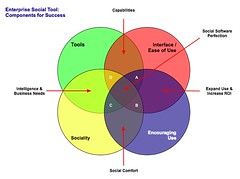
Four Rings of Enterprise Social Tools

Enterprise Social Tool: Components for Success The four elements really have to work together to make for a successful services that people will use and continue to use over time. Yes, I am using a venn diagram for the four rings as it helps point out the overlaps and gaps where the implementations can fall short. The overlaps in the diagram is where the interesting things are happening. A year ago I was running into organizations with self proclaimed success with deployments of social tools (blogs, wikis, social bookmarking, forums, etc.), but as the desire for more than a simple set of blogs (or whichever tool or set of tools was selected) in-house there is a desire for greater use beyond some internal early adopters. This requires paying close attention to the four rings.

Tools

The first ring is rather obvious, it is the tools. The tools come down to functionality and features that are offered, how they are run (OS, rack mount, other software needed, skills needed to keep them running, etc.), how the tools are integrated into the organization (authentication, back-up, etc.), external data services, and the rest of the the usual IT department checklist. The tools get a lot of attention from many analysts and tech evangelists. There is an incredible amount of attention on widgets, feeds, APIs, and elements for user generated contribution. But, the tools do not get you all of the way to a successful implementation. The tools are not a mix and match proposition.

Interface & Ease of Use

One thing that the social software tools from the consumer web have brought is ease of use and simple to understand interfaces. The tools basically get out of the way and bring in more advanced features and functionality as needed. The interface also needs to conform to expectations and understandings inside an organization to handle the flow of interaction. What works for one organization may be difficult for another organization, largely due to the tools and training, and exposure to services outside their organization. Many traditional enterprise tools have been trying to improve the usability and ease of use for their tools over the last 4 to 5 years or so, but those efforts still require massive training and large binders that walk people through the tools. If the people using the tools (not administering the tools need massive amounts of training or large binders for social software the wrong tool has been purchased).

Sociality

Sociality is the area where people manage their sharing of information and their connections to others. Many people make the assumption that social tools focus on everything being shared with everybody, but that is not the reality in organizations. Most organizations have tight boundaries on who can share what with whom, but most of those boundaries get in the way. One of the things I do to help organizations is help them realize what really needs to be private and not shared is often much less than what they regulate. Most people are not really comfortable sharing information with people they do not know, so having comfortable spaces for people to share things is important, but these spaces need to have permeable walls that encourage sharing and opening up when people are sure they are correct with their findings.

Sociality also includes the selective groups people belong to in organizations for project work, research, support, etc. that are normal inside organizations to optimize efficiency. But, where things get really difficult is when groups are working on similar tasks that will benefit from horizontal connections and sharing of information. This horizontal sharing (as well as diagonal sharing) is where the real power of social tools come into play as the vertical channels of traditional organization structures largely serve to make organizations inefficient and lacking intelligence. The real challenge for the tools is the capability to surface the information of relevance from selective groups to other selective groups (or share information more easily out) along the way. Most tools are not to this point yet, largely because customers have not been asking for this (it is a need that comes from use over time) and it can be a difficult problem to solve.

One prime ingredient for social tool use by people is providing a focus on the people using the tools and their needs for managing the information they share and the information from others that flow through the tool. Far too often the tools focus on the value the user generated content has on the system and information, which lacks the focus of why people use the tools over time. People use tools that provide value to them. The personal sociality elements of whom are they following and sharing things with, managing all contributions and activities they personally made in a tool, ease of tracking information they have interest in, and making modifications are all valuable elements for the tools to incorporate. The social tools are not in place just to serve the organization, they must also serve the people using the tools if adoption and long term use important.

Encouraging Use

Encouraging use and engagement with the tools is an area that all organizations find they have a need for at some point and time. Use of these tools and engagement by people in an organization often does not happen easily. Why? Normally, most of the people in the organization do not have a conceptual framework for what the tools do and the value the individuals will derive. The value they people using the tools will derive needs to be brought to the forefront. People also usually need to have it explained that the tools are as simple as they seem. People also need to be reassured that their voice matters and they are encouraged to share what they know (problems, solutions, and observations).

While the egregious actions that happen out on the open web are very rare inside an organization (transparency of who a person is keeps this from happening) there is a need for a community manager and social tool leader. This role highlights how the tools can be used. They are there to help people find value in the tools and provide comfort around understanding how the information is used and how sharing with others is beneficial. Encouraging use takes understanding the tools, interface, sociality, and the organization with its traditions and ways of working.

The Overlaps

The overlaps in the graphic are where things really start to surface with the value and the need for a holistic view. Where two rings over lap the value is easy to see, but where three rings overlap the missing element or element that is deficient is easier to understand its value.

Tools and Interface

Traditional enterprise offerings have focussed on the tools and interface through usability and personalization. But the tools have always been cumbersome and the interfaces are not easy to use. The combination of the tools and interface are the core capabilities that traditionally get considered. The interface is often quite flexible for modification to meet an organizations needs and desires, but the capabilities for the interface need to be there to be flexible. The interface design and interaction needs people who have depth in understanding the broad social and information needs the new tools require, which is going to be different than the consumer web offerings (many of them are not well thought through and do not warrant copying).

Tools and Sociality

Intelligence and business needs are what surface out of the tools capabilities and sociality. Having proper sociality that provides personal tools for managing information flows and sharing with groups as well as everybody as it makes sense to an individual is important. Opening up the sharing as early as possible will help an organization get smarter about itself and within itself. Sociality also include personal use and information management, which far few tools consider. This overlap of tools and sociality is where many tools are needing improvement today.

Interface and Encouraging Use

Good interfaces with easy interaction and general ease of use as well as support for encouraging use are where expanding use of the tools takes place, which in turn improves the return on investment. The ease of use and simple interfaces on combined with guidance that provides conceptual understanding of what these tools do as well as providing understanding that eases fears around using the tools (often people are fearful that what they share will be used against them or their job will go away because they shared what they know, rather than they become more valuable to an organization by sharing as they exhibit expertise). Many people are also unsure of tools that are not overly cumbersome and that get out of the way of putting information in to the tools. This needs explanation and encouragement, which is different than in-depth training sessions.

Sociality and Encouraging Use

The real advantages of social tools come from the combination of getting sociality and encouraging use correct. The sociality component provides the means to interact (or not) as needed. This is provided by the capabilities of the product or products used. This coupled with a person or persons encouraging use that show the value, take away the fears, and provide a common framework for people to think about and use the tools is where social comfort is created. From social comfort people come to rely on the tools and services more as a means to share, connect, and engage with the organization as a whole. The richness of the tools is enabled when these two elements are done well.

The Missing Piece in Overlaps

This section focusses on the graphic and the three-way overlaps (listed by letter: A; B; C; and D). The element missing in the overlap or where that element is deficient is the focus.

Overlap A

This overlap has sociality missing. When the tool, interface, and engagement are solid, but sociality is not done well for an organization there may be strong initial use, but use will often stagnate. This happens because the sharing is not done in a manner that provides comfort or the services are missing a personal management space to hold on to a person's own actions. Tracking one's own actions and the relevant activities of others around the personal actions is essential to engaging socially with the tools, people, and organization. Providing comfortable spaces to work with others is essential. One element of comfort is built from know who the others are whom people are working with, see Elements of Social Software and Selective Sociality and Social Villages (particularly the build order of social software elements) to understand the importance.

Overlap B

This overlap has tools missing, but has sociality, interface, and encouraging use done well. The tools can be deficient as they may not provide needed functionality, features, or may not scale as needed. Often organizations can grow out of a tool as their needs expand or change as people use the tools need more functionality. I have talked with a few organizations that have used tools that provide simple functionality as blogs, wikis, or social bookmarking tools find that as the use of the tools grows the tools do not keep up with the needs. At times the tools have to be heavily modified to provide functionality or additional elements are needed from a different type of tool.

Overlap C

Interface and ease of use is missing, while sociality, tool, and encouraging use are covered well. This is an area where traditional enterprise tools have problems or tools that are built internally often stumble. This scenario often leads to a lot more training or encouraging use. Another downfall is enterprise tools are focussed on having their tools look and interact like consumer social web tools, which often are lacking in solid interaction design and user testing. The use of social tools in-house will often not have broad use of these consumer services so the normal conventions are not understood or are not comfortable. Often the interfaces inside organizations will need to be tested and there many need to be more than one interface and feature set provided for depth of use and match to use perceptions.

Also, what works for one organization, subset of an organization, or reviewer/analyst will not work for others. The understanding of an organization along with user testing and evaluation with a cross section of real people will provide the best understanding of compatibility with interface. Interfaces can also take time to take hold and makes sense. Interfaces that focus on ease of use with more advanced capabilities with in reach, as well as being easily modified for look and interactions that are familiar to an organization can help resolve this.

Overlap D

Encouraging use and providing people to help ease people's engagement is missing in many organizations. This is a task that is often overlooked. The tools, interface, and proper sociality can all be in place, but not having people to help provide a framework to show the value people get from using the tools, easing concerns, giving examples of uses for different roles and needs, and continually showing people success others in an organization have with the social tool offerings is where many organization find they get stuck. The early adopters in an organization may use the tools as will those with some familiarity with the consumer web social services, but that is often a small percentage of an organization.

Summary

All of this is still emergent and early, but these trends and highlights are things I am finding common. The two areas that are toughest to get things right are sociality and encouraging use. Sociality is largely dependent on the tools, finding the limitations in the tools takes a fair amount of testing often to find limitations. Encouraging use is more difficult at the moment as there are relatively few people who understand the tools and the context that organizations bring to the tools, which is quite different from the context of the consumer social web tools. I personally only know of a handful or so of people who really grasp this well enough to be hired. Knowing the "it depends moments" is essential and knowing that use is granular as are the needs of the people in the organization. Often there are more than 10 different use personas if not more that are needed for evaluating tools, interface, sociality, and encouraging use (in some organizations it can be over 20). The tools can be simple, but getting this mix right is not simple, yet.

[Comments are open and moderated at Enterprise Social Tools: Components for Success :: Personal InfoCloud


3 May 2008

Getting Info into the Field with Extension

This week I was down in Raleigh, North Carolina to speak at National Extension Technology Conference (NETC) 2008, which is for the people running the web and technology components for what used to be the agricultural extension of state universities, but now includes much more. This was a great conference to connect with people trying to bring education, information, and knowledge services to all communities, including those in rural areas where only have dial-up connectivity to get internet access. The subject matter presented is very familiar to many other conferences I attend and present at, but with a slightly different twist, they focus on ease of use and access to information for everybody and not just the relatively early adopters. The real values of light easy to use interfaces that are clear to understand, well structured, easy to load, and include affordance in the initial design consideration is essential.

I sat in on a few sessions, so to help tie my presentation to the audience, but also listen to interest and problems as they compare to the organizations I normally talk to and work with (mid-size member organizations up to very large global enterprise). I sat in on a MOSS discussion. This discussion about Sharepoint was indiscernible from any other type of organization around getting it to work well, licensing, and really clumsy as well as restrictive sociality. The discussion about the templates for different types of interface (blogs and wikis) were the same as they they do not really do or act like the template names. The group seemed to have less frustration with the wiki template, although admitted it was far less than perfect, it did work to some degree with the blog template was a failure (I normally hear both are less than useful and only resemble the tools in name not use). [This still has me thinking Sharepoint is like the entry drug for social software in organizations, it looks and sounds right and cool, but is lacking the desired kick.]

I also sat down with the project leads and developers of an eXtension wide tool that is really interesting to me. It serves the eXtension community and they are really uncoupling the guts of the web tools to ease greater access to relevant information. This flattening of the structures and new ways of accessing information is already proving beneficial to them, but it also has brought up the potential to improve ease some of the transition for those new to the tools. I was able to provide feedback that should provide a good next step. I am looking forward to see that tool and the feedback in the next three to six months as it has incredible potential to ease information use into the hands that really need it. It will also be a good example for how other organizations can benefit from similar approaches.

Comments are open (with usual moderation) at this post at Getting Info into the Field with Extension :: Personal InfoCloud.


This work is licensed under the Creative Commons Attribution-NonCommercial-ShareAlike License.