Off the Top: Usability Entries

20052010201520202025

Showing posts: 1-15 of 138 total posts


5 September 2026

A Quick Category Page Lab Update

Today I thought I may be able to tackle 2 of the 6 tasks for features and functionality I want to take care of before moving the Category page in the Lab to the production side. Well, one of the tasks (the definitions) I knew is going to be pushed out as it going to take sit down and type words time. The other sort of large task was going to break some ease of use functionality and breaking something I find helpful is a bit of a problem, but also adds odd friction.

What Got Done

I was able to knock out four of the tasks that get the Category page in a much better place than it is at the moment.

The sidebar with the “Year Range” and “Co-category” selection was cleaned up and now with fixing the line wrapping for the long category names, so they no longer go under the radio button when the line wraps.

The inconsistency of the design of the counts for the two areas of selection is fixed and now the count has a subtle light box around them so the counts are noticeable but not drawing too much attention. Working with shades of orange is always tedious, but I like orange enough to deal with it.

There is now a noticeably clear filter selections button for the sidebar and in the main content section at the top. The button at the bottom of the sidebar to submit the filter selections matches the clear the filters buttons. The sidebar radio buttons (if you have JavaScript on) don’t require the submit button, but it is there for those with JavaScript turned off. This wraps up the sidebar.

The unfiltered category page now starts with a distribution chart that is larger than the sparklines on the category listing pages and it has small demarcations every 5 years. This is generated with SVG, like the sparklines.

When you make filter selections the distribution chart goes away (until the selections are cleared) and the filters selected are now laid out properly. This section also has a clear filter selection button as well.

You can try it from the link in the category filtering test section of the Lab notes about this.

This May be Close to Pushing Live

I am going to sleep on it and possibly push it live tomorrow on on the holiday Monday.


25 August 2026

Vibe Markets Don’t Always Rhyme with Good Product

My recent Four Cornerstones of Development post (which I found the initial blog mention on a March 2001 archive page - Off the Top :: March 2001 and later on mention I’m working on an essay on it, which I somewhat remember having a publication ask me to write it for them, but no longer exists) was surfacing in discussion a bit lately when talking with those building quick things for themselves that they had used LLM for coding (as well as much of the interaction and visual design), which is viable for personal use for a stretch and then you hit the reliable, maintainable, repeatable thresholds of pain.

Ooh! This Looks Interesting

But, I’ve looked at a quite a few of these projects (not those that aren’t really products) as they initially seem like they would solve a use case gap I have. But, I saw a video for an app that was pitched and it hit a long-standing need I had that has heavy friction. It was an app that linked to Glaze, which is a product / service from Raycast. I read through the information about Glaze and thought this could be “interesting”. I had trouble finding the app that caught my interest as the Glaze app marketplace is a mess. I finally found the app, looked at the descriptions and images and figured I’d give it a go. I found I had to download the Glaze app to seemingly run the app I wanted within Glaze. This was less than optimal putting a silo wrapper around apps, that has never worked well and there is a long and abundant history of attempts at this poor model. (An app with scripts and workflows that can be added through a marketplace / gallery like Raycast or Alfred is a good model, but full apps that is a very different story).

The Needed Perspective Framing (Likely to be skipped to preserve a rant)

I’m not adverse to people using coding assistance, but there is a lot more to building an app or script than just code (and often being a developer or engineer helps keep the AI coding assistance in check as they can resurface long gone poor practices that are abundant in the training material). Not having background in development nor product management nor design creates a lot of gaps and little depth to know if something is actually good or not.

I’ve Seen this Movie Before and …

I opened Glaze and got the app I had interest in set up, and it was slow, not well considered with limited functionality that would be helpful for a basic app in the genre it sat in. The hope I had was shot, I was rather disappointed (it happens a lot) with the level of a “proof of concept” build that only examines is something possible to let you then you interrogate the hell out of it to figure out what is wrong and how to improve it before you get to the prototype or alpha version. I shut the app and won’t open it again.

I looked at other apps in Glaze. All I looked at had the same level of quality (or I should say lack of quality and basic understanding of what an app is, let alone what a product is).

I jumped to the four cornerstones, as I would on something I was building or running a product group that is creating and developing. Things were sort of usable, but half a cornerstone doesn’t get you very far. There is a lot to know and understand beside an interface that does something and I haven’t found AI services that fill much of this ground that needs to be covered in a solid manner. They can help code decently on small-ish projects (and slightly larger) and get okay (yet often problematic) interfaces. But, the other considerations and forward-looking needs to plan for or at a minimum consider so to account for future adaptation are missing or not supported well. The person building has to bring that understanding with them to drive this to a decent outcome.

Creating an app seems easy but there is a lot that should be considered and accounted for in the process, even for something simple. Putting out what will soon be abandoned ware with a “developer” / creator that didn’t quite ship something solid and left it at that, and not to return.

It May be an Idea Farm

There are a lot of great ideas in Glaze, but the lack of quality has me deleting the Glaze and adding a reminder to not go back. The deletion of Glaze took around 2 hours as the thorough app deletion tools I have were getting errors from many components claiming deletion was not permitted. This often happens when an app is running, but the app had been quit. It has been a long time since I’ve had to go through rounds of rebooting my Mac to rip out stubborn poor app remnants.

Know What You are Getting In To

There are people who have been building good niche products that have used AI to help fill gaps. Most of them have a lot of experience with UI, UX, product, and/or development to know what needs to be done at least at a basic level. Not all of them have worked through all four cornerstones, but they have considered them, and have lived through the hell from not considering and/or working through the cornerstones.


23 August 2026

Four Cornerstones of Development

In the late 1990s through 2010s when working with development and product teams the four cornerstones of development were always at the tip of the tongue or as a small poster on a wall somewhere. I know I wrote this up somewhere before and likely presented it in the late 1990s and/or early 2000s. Working in enterprise environments where people would get involved in product and development, but don’t have background these cornerstones were essential to bring up as basics.

The last few weeks and months I’ve been thinking of this a lot and wanting to point to it, but realized it isn’t really on line other than a quick mention in a 2003 post of mine – Needs When Running a Service. Actually, it is something I am always wanting to point to. With the increase of vibe coding and people creating products for “unique” purposes, but then people are sharing these more widely than personal use, the need for understanding and considering what they are getting into is really needed.

The Four Cornerstones of Development

These four cornerstones were initially called out for information application development, but applied to all user-centered development and product management. If a team building didn’t focus on all four of the elements from the beginning to make the right decisions early (or have them framed and adaptable) the product was really going to struggle.

The four elements are: Usable; Reliable; Maintainable; and Repeatable.

In the current state of quick development by non-developers using LLM coding tools the only one of these cornerstones that is known or partly handled is the first cornerstone, usable. What is made may be usable, or mostly usable, but that won’t really last and when selling it, sharing it widely, or having others rely on it. The reality means the person developing and shipping has unintentionally signed up for things they don’t have background in and often the LLMs aren’t that helpful with. Much of what is coming out as apps are proof-of-concept level of completion, which doesn’t get into any consideration of the other three cornerstones.

Usable

Usable is the first hurdle and focusing on the user and their needs. If things aren’t usable the offering doesn’t really have much. The other cornerstones don’t really matter, if the offering isn’t usable. But, usable and not having the other cornerstones will be problematic.

To be usable, even if it is a single simple use case, how adjacent use cases that aren’t supported are handled or avoided should be as clear as possible. The capabilities and limitations being clear help with the ease of use and understanding something when someone hasn’t touched it in months.

Reliable

The reliable cornerstone is what starts making the offering stable, secure, and enduring. The bugs have been remediated and it works as intended continually. Security and levels of privacy considerations have been put in place and consistently work as intended. But, so do the core myriad of use cases that were intended to work and also be supported, continue to work.

Lacking reliability you have something that breaks at various stress levels and use cases (core uses cases or edge cases). Building and shipping requires setting bounds for what is supported and how, but also how well the edges of what is supported are handled.

Maintainable

Maintainable gets to the reality that products and shipping them doesn’t mean something is done when shipped, it is the beginning. When planning out what is being built how it will be maintained over time and supported is essential. How will the product be updated to support changes to the coding language and/or operating system, and device updates. How do the regular changes in languages and operating systems get handled where security patches are made and break apps and services for users that use apps and services that aren’t updated.

User / customer support and how this is handled also falls into the maintainable cornerstone. Planning for maintainability and how that will be handled needs to include support as the two are often tightly related. When something breaks or doesn’t work as expected, that becomes support work. The support work is often related to considerations and steps (or not making them) the area of the maintainable cornerstone.

Repeatable

Repeatable is one that often gets left of consideration and one that is essential if what you built gets popular and scale. It is often thought of as something that may happen in the future, but understanding early on how to handle repeatability means it should be easier when the time arrives. Repeatability is needed when a server or service built on crashes and is not available or you need to replicate server backends for supporting the service as it scales (there are a lot of needs for repeatability, including building sandboxes to test and develop).

Everything changes as it scales and understanding that at the start of everything (product, organization creation, shared simple scripting project, etc.), gives a decent foothold to when growing and scaling hits. Planning not to scale is also an option, but often that can take just as much work as scaling and you need to be prepared for not scaling when others really want what you’ve made.

Not planning for this early and accounting for how to design the development of the app and/or services for this will lead to painful issues with growth or the reality of moving from one supporting backend server / service to another as things change (often more quickly than we expect).

Wrapping the Cornerstones to Help Make Decisions

The cornerstones were really helpful 20 to almost 30 years ago for a quick reality check for early early-stage planning and building something to ship. Building something and shipping it is the start, not the end. All four cornerstones will provide stability once things are shipped if you have planned understanding and using the cornerstones.

Today, much like early-ish web thinking of how far you want to open something up for use by others comes from considering the cornerstones. If all that is considered is just use and there is no interest in the other corner stones or just partial interest or capacity, it is likely good to keep the use of it limited to friends and or family, similar, or perhaps tighter.


17 March 2015

Mobile Apps and Enabling Content Use and Reuse

This morning I read Dave Winer’s “When will the 140-char wall come down” that aside from the focus of the piece is the secondary focus on mobile. The part that caught my attention is the section that mentions Facebook’s discussions with content publishers.

David Carr ran an article in the NY Times last October that previewed the pitch we'll likely hear. They want publishers to post full content to Facebook. In return they are willing to share ad revenue with the publishers.

The reason this is so important? In a mobile environment, clicking on a link to read a story is a very big price. We all know that mobile is where Facebook’s growth is coming from. News reading on mobile can become much more fluid. That's what Facebook wants to do.

This pulling content into large commercial social platform’s mobile apps is also problematic. While I really understand the value of not having the users click out of the service and keeping ad revenues pegged to a higher level, it is this lock-in that creates problems. For those of us who value content and being able to refind content and easily quote it and pull it together in links (as is done in this post) these walled gardens of social platforms have rather overbearing walls that make ease of personal information management a giant chore. Many of the social platforms offer some connection to bookmark, send to a full browser, and / or to other apps on the mobile device. Each service is different, most offer some means of getting the content out to functional tools or providing them within their app, but some (like LinkedIn offer nothing, which is really painful and horribly thought through).

The Value to Publishers of Connecting Content

Why should publishers care about their content in a commercial social platform like Facebook? As Dave Winer points out it is about mobile access and what apps and services to people spend time in. A common adage and mindset is to place your content were people are and can see your content. This makes sense to be in the commercial social platforms. Also people share in these social platforms things they find of interest. But, the downside is the lack of ease for people to share out into other social platforms and hold on to content for greater value add outside one platform.

The ability and ease of getting content out of the social platform’s mobile app and into a browser has value, as the browser often have user’s bookmarklets to tuck things into services to read things later (like Instapaper), bookmark it in services (like Pinboard) or a work service (like KnowledgePlaza), or grab an interesting snippet for later (in something like Evernote). All of these not only add personal value to the reader using these services, but most often this content is easily shared to others who follow the link and go read the publisher’s content. If the content is not linked to the publisher’s site and to the social platform, that often hinders people from going.

As publishers consider going this route they need to understand the referral value from power readers and how social platforms currently add friction to that model of value generation.


13 November 2014

Finding Voice and Freeing my Mind

The effort to return to a habit of regular blogging has been really helpful. But, it has also not solved some inner conflict I thought was going to be a breeze to push past. In my initial push the Refinement can be a Hinderance post really is a tough speed bump to clear. I have a long list of blogfodder queued up for my more formal and work focussed blog, Personal InfoCloud, but now I’m noticing a queue here on this blog as well.

Part of this effort on this blog is to just get things out of my head and shared. I’m realizing time is a hurdle (more correctly lack of time), but getting things framed well and not making a fool (there is a huge part of my inner self that loves to play the jester) of myself. In blogging I’m trying to work writing as an easy sprint again. I am trying to not pay attention to voice, nor what sorts of things I am finding of interest to share. I have been hoping it would evolve, has it did in the very beginning and again with a few other reboots. In this I am finding I am noting things of interest, but not fleshing them out quickly and marking them as to do later, which was my counter intent. Part of this shifting ideas to blogfodder lists rather than knocking it out is there are other things that get my attention as I sit to write.

I am ending up with a few new category terms to add to my pick list. I am also wanting to use this blog to frame and shape ideas and maps forward for the Personal InfoCloud blog. I’m likely going to list out all of the 14 or 15 Shift Happened posts that are brewing as a post here in the near future. I’m also thinking of listing all the social lenses as an outline - downside to this is I want to point to all the existing posts over the years that have become part of the social lenses.

Potentially Adding Linkblogging Back Again

I am also thinking of doing quick link blog posts, which fall into a longer Pinboard or Delicious social bookmark and add more narrative. I keep thinking I want a slightly different input form for those (I had one for Quick Links years back before Delicious started, but it doesn’t quite fit the bill these days). I also have a love / hate for blogger’s link blogging as the header link goes way from their blog and not to a permalink page with a little more info. The user interface is not differentiated in any way, or done incredibly poorly on most sites. But, I am trying not to let the short comings of other’s sites deter my own use of link blogging, but I would keep the header link consistent and link it locally to a node page and have a proper link out to the site or object in the text.

No More Meta - Maybe

With each of these meta posts about this blog as post in this blog, I swear it is my last one.

I also realized my new hosting server (sat in New York I believe) is not using local time, but GMT instead. This is better than the time stamping of blog posts on my old server / host in Sydney (yes, I know I can fix this with a simple conversion, but that requires writing the conversion). One day I may fix that. One day.


30 March 2011

Late to Realizing Ovi Maps Does Exactly What I Wish

I been a big fan of Nokia's mapping solution built into its smart phones, Ovi Maps as it provides the best mobile turn by turn directions I've seen on any mobile device. But, this is largely because Nokia owns Navteq, which has long been the leader for on board mapping and driving solutions.

That FINALLY! Moment Reached

While I have been incredibly impressed with the Ovi mapping on my Nokia E72 device and often use the Ovi resources on the web, I hit that finally, somebody got this right moment with Ovi over the weekend. While, many web mapping solutions allow you to save favorites on the web getting those to sync to your mobile device, with your directions has been left out of most of these solutions (I have been complaining to friends at Google, Yahoo, and elsewhere for many years that this is a no-duh next step). Well, it seems Ovi figured this out quite a while back. (I noticed Google Mobile Maps provided this at the end of 2009, but have never been able to get it to work, even on my supported Symbian device.)

The simplicity and ease with with Nokia's Ovi pulls this off is rather stunning. With this aha moment, I feel like I was the last one to see this and sort it out, but in chats with other mobile maps and navigation users, they have been pained waiting for exactly this functionality, as most people it seems will get a location link and add it to their desktop maps (particularly for travel) but that does them little good as they don't take their desktop or open laptop into the car with them, they take their mobile. Understanding context of use is incredibly valuable.

Now may be a good time to check your device's capability, although iPhone does not seem to have this functionality supported by Google maps (surprised?).


22 February 2011

The Genius of Design - BBC Series Overview

This past Summer (2010) the BBC (BBC 2) showed a five part documentary series on design, called The Genius of Design (TGoD). This series is similar to Gary Hustwit's Objectified, but TGoD goes much broader and deeper offering a better reflection of the reality of design only seen through that depth. Think of Objectified as a taste sampler of TGoD. There are some people in common between the two whom are interviewed and focussed upon, but life is breathed into architecture, process, visual, industrial, and many more slices of the design world that bring design to life in TGoD. It is a wonderful look at the real nature of design.

The Five Episodes of The Genius of Design

The five episodes are: 1) Ghosts in the Machine; 2) Designs for Living; 3) Blueprints for War; 4) Better Living Through Chemistry; 5) Objects of Desire. The core focus is on the deep consideration and understanding that goes into design. It is this rigor of understanding and working through to final product all based on a core objective. Throughout the five series the focus on a deep understanding the materials deeply, use, impact on the people interacting with what has been designed, and development processes (as well as optimizing them).

Standout Themes

The obsession to understand the materials used and objects being design with depth and breadth is not the only standout theme. Many other themes and take away ideas stood out not only when watching, but also now many months later.

Focus on End Use and People Using Product of Design

One major reoccurring theme throughout is the focus on end use. The the products not only should be pleasing nearly (possibly to the point of being emotive), but they must also be usable, and do what it is intended to do very well. A continual focus on the person using what is designed is one of the central tenets of design and with out this it is something other than design.

Breadth of Design Disciplines and Roles

To the point of design having a focus on the person using what is designed, the breath of roles within design was brought up. Wonderfully, Peter Boersma's T-Model was directly mentioned in when discussing the breadth of expertise with required depth and roles in design that are required to all come together to optimally create a final product that is please and usable for the person who engages with the final product. While watching the whole series the focus on various disciplines and roles is very evident and when listening to the designers talk about their own focus and discipline (all largely falling under the moniker of design) as it relates to final crafting of the final object) it is they all have depth in their own discipline, but understand the materials deeply and the class and required needs for the final product very well.

Every Designer Has A Chair In Them

Another reoccurring thread, that gets depth of focus a few times, is the idea that every designer has a chair in them (this has become a meme in the broad design community from the near instant this was uttered mid-Summer). The chair is emblematic of the need for utility (purpose, comfort, durability, etc.) as well as providing style. A chair that collapses is not well designed. The chair also often has requirements beyond basic sitting, which can include long term comfort, ability to stack and store it, be environmentally friendly, and many more possible variations. This intersection of use, style, material, and production around the chair leads to a lot of the depth of understanding required to get to a final product prototyped, tested, and into production. This depth and breadth that designers put in is often not considered by people outside the design community, but also the depth and rigor involved in design is missed in some disciplines that are tangential to design, but do not consider themselves purely in the design profession.

Process Design and Optimization

Within the Blueprints for War episode the focus of designing the process was often repeated. The episode focussed on Britain in World War II and the need to have mass production of goods needed for the war that worked for their purposes, but there were limitations of materials and time needed to get mass amounts of goods in military personnel’s hands. Streamlining production and simplifying the goods became essential, but as well thinking of solutions seemed like their was expansive production (dummy planes, etc.) and alternate facilities (fake factories) were included in the design mix.

Wishing for More

In all this was a fantastic series for those in and around the design profession, those who intersect with design, and just fans of design.


27 June 2009

Social Design for the Enterprise Workshop in Washington, DC Area

I am finally bringing workshop to my home base, the Washington, DC area. I am putting on a my "Social Design for the Enterprise" half-day workshop on the afternoon of July 17th at Viget Labs (register from this prior link).

Yes, it is a Friday in the Summer in Washington, DC area. This is the filter to sort out who really wants to improve what they offer and how successful they want their products and solutions to be.

Past Attendees have Said...

"A few hours and a few hundred dollar saved us tens of thousands, if not well into six figures dollars of value through improving our understanding" (Global insurance company intranet director)

From an in-house workshop:
"We are only an hour in, can we stop? We need to get many more people here to hear this as we have been on the wrong path as an organization" (National consumer service provider)

"Can you let us know when you give this again as we need our [big consulting firm] here, they need to hear that this is the path and focus we need" (Fortune 100 company senior manager for collaboration platforms)

"In the last 15 minutes what you walked us through helped us understand a problem we have had for 2 years and a provided manner to think about it in a way we can finally move forward and solve it" (CEO social tool product company)

Is the Workshop Only for Designers?

No, the workshop is aimed at a broad audience. The focus of the workshop gets beyond the tools' features and functionality to provide understanding of the other elements that make a giant difference in adoption, use, and value derived by people using and the system owners.

The workshop is for user experience designers (information architects, interaction designers, social interaction designers, etc.), developers, product managers, buyers, implementers, and those with social tools running already running.

Not Only for Enterprise

This workshop with address problems for designing social tools for much better adoption in the enterprise (in-house use in business, government, & non-profit), but web facing social tools.

The Workshop will Address:

Designing for social comfort requires understanding how people interact in a non-mediated environment and what realities that we know from that understanding must we include in our design and development for use and adoption of our digital social tools if we want optimal adoption and use.

  • Tools do not need to be constrained by accepting the 1-9-90 myth.
  • Understanding the social build order and how to use that to identify gaps that need design solutions
  • Social comfort as a key component
  • Matrix of Perception to better understanding who the use types are and how deeply the use the tool so to build to their needs and delivering much greater value for them, which leads to improved use and adoption
  • Using the for elements for enterprise social tool success (as well as web facing) to better understand where and how to focus understanding gaps and needs for improvement.
  • Ways user experience design can be implemented to increase adoption, use, and value
  • How social design needs are different from Web 2.0 and what Web 2.0 could improve with this understanding

More info...

For more information and registration to to Viget Lab's Social Design for the Enterprise page.

I look forward to seeing you there.


12 March 2009

Catching Up On Personal InfoCloud Blog Posts

Things here are a little quiet as I have been in writing mode as well as pitching new work. I have been blogging work related items over at Personal InfoCloud, but I am likely only going to be posting summaries of those pieces here from now on, rather than the full posts. I am doing this to concentrate work related posts, particularly on a platform that has commenting available. I am still running my own blogging tool here at vanderwal.net I wrote in 2001 and turned off the comments in 2006 after growing tired of dealing comment spam.

The following are recently posted over at Personal InfoCloud

SharePoint 2007: Gateway Drug to Enterprise Social Tools

SharePoint 2007: Gateway Drug to Enterprise Social Tools focusses on the myriad of discussions I have had with clients of mine, potential clients, and others from organizations sharing their views and frustrations with Microsoft SharePoint as a means to bring solid social software into the workplace. This post has been brewing for about two years and is now finally posted.

Optimizing Tagging UI for People & Search

Optimizing Tagging UI for People and Search focuses on the lessons learned and usability research myself and others have done on the various input interfaces for tagging, particularly tagging with using multi-term tags (tags with more than one word). The popular tools have inhibited adoption of tagging with poor tagging interaction design and poor patterns for humans entering tags that make sense to themselves as humans.

LinkedIn: Social Interaction Design Lessons Learned (not to follow)

I have a two part post on LinkedIn's social interaction design. LinkedIn: Social Interaction Design Lessons Learned (not to follow) - 1 of 2 looks at what LinkedIn has done well in the past and had built on top. Many people have expressed the new social interactions on LinkedIn have decreased the value of the service for them.

The second part, LinkedIn: Social Interaction Design Lessons Learned (not to follow) - 2 of 2 looks at the social interaction that has been added to LinkedIn in the last 18 months or so and what lessons have we as users of the service who pay attention to social interaction design have learned. This piece also list ways forward from what is in place currently.


7 May 2008

Enterprise Social Tools: Components for Success

One of the things I continually run across talking with organizations deploying social tools inside their organization is the difficultly getting all the components to mesh. Nearly everybody is having or had a tough time with getting employees and partners to engage with the services, but everybody is finding out it is much more than just the tools that are needed to consider. The tools provide the foundation, but once service types and features are sorted out, it get much tougher. I get frustrated (as do many organizations whom I talk with lately) that social tools and services that make up enterprise 2.0, or whatever people want to call it, are far from the end of the need for getting it right. There is great value in these tools and the cost of the tools is much less than previous generations of enterprise (large organization) offerings.

Social tools require much more than just the tools for their implementation to be successful. Tool selection is tough as no tool is doing everything well and they all are focussing on niche areas. But, as difficult as the tool selection can be, there are three more elements that make up what the a successful deployment of the tools and can be considered part of the tools.

Four Rings of Enterprise Social Tools
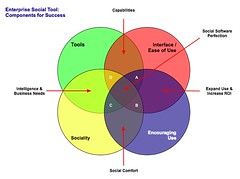
Enterprise Social Tool: Components for Success The four elements really have to work together to make for a successful services that people will use and continue to use over time. Yes, I am using a venn diagram for the four rings as it helps point out the overlaps and gaps where the implementations can fall short. The overlaps in the diagram is where the interesting things are happening. A year ago I was running into organizations with self proclaimed success with deployments of social tools (blogs, wikis, social bookmarking, forums, etc.), but as the desire for more than a simple set of blogs (or whichever tool or set of tools was selected) in-house there is a desire for greater use beyond some internal early adopters. This requires paying close attention to the four rings.

Tools

The first ring is rather obvious, it is the tools. The tools come down to functionality and features that are offered, how they are run (OS, rack mount, other software needed, skills needed to keep them running, etc.), how the tools are integrated into the organization (authentication, back-up, etc.), external data services, and the rest of the the usual IT department checklist. The tools get a lot of attention from many analysts and tech evangelists. There is an incredible amount of attention on widgets, feeds, APIs, and elements for user generated contribution. But, the tools do not get you all of the way to a successful implementation. The tools are not a mix and match proposition.

Interface & Ease of Use

One thing that the social software tools from the consumer web have brought is ease of use and simple to understand interfaces. The tools basically get out of the way and bring in more advanced features and functionality as needed. The interface also needs to conform to expectations and understandings inside an organization to handle the flow of interaction. What works for one organization may be difficult for another organization, largely due to the tools and training, and exposure to services outside their organization. Many traditional enterprise tools have been trying to improve the usability and ease of use for their tools over the last 4 to 5 years or so, but those efforts still require massive training and large binders that walk people through the tools. If the people using the tools (not administering the tools need massive amounts of training or large binders for social software the wrong tool has been purchased).

Sociality

Sociality is the area where people manage their sharing of information and their connections to others. Many people make the assumption that social tools focus on everything being shared with everybody, but that is not the reality in organizations. Most organizations have tight boundaries on who can share what with whom, but most of those boundaries get in the way. One of the things I do to help organizations is help them realize what really needs to be private and not shared is often much less than what they regulate. Most people are not really comfortable sharing information with people they do not know, so having comfortable spaces for people to share things is important, but these spaces need to have permeable walls that encourage sharing and opening up when people are sure they are correct with their findings.

Sociality also includes the selective groups people belong to in organizations for project work, research, support, etc. that are normal inside organizations to optimize efficiency. But, where things get really difficult is when groups are working on similar tasks that will benefit from horizontal connections and sharing of information. This horizontal sharing (as well as diagonal sharing) is where the real power of social tools come into play as the vertical channels of traditional organization structures largely serve to make organizations inefficient and lacking intelligence. The real challenge for the tools is the capability to surface the information of relevance from selective groups to other selective groups (or share information more easily out) along the way. Most tools are not to this point yet, largely because customers have not been asking for this (it is a need that comes from use over time) and it can be a difficult problem to solve.

One prime ingredient for social tool use by people is providing a focus on the people using the tools and their needs for managing the information they share and the information from others that flow through the tool. Far too often the tools focus on the value the user generated content has on the system and information, which lacks the focus of why people use the tools over time. People use tools that provide value to them. The personal sociality elements of whom are they following and sharing things with, managing all contributions and activities they personally made in a tool, ease of tracking information they have interest in, and making modifications are all valuable elements for the tools to incorporate. The social tools are not in place just to serve the organization, they must also serve the people using the tools if adoption and long term use important.

Encouraging Use

Encouraging use and engagement with the tools is an area that all organizations find they have a need for at some point and time. Use of these tools and engagement by people in an organization often does not happen easily. Why? Normally, most of the people in the organization do not have a conceptual framework for what the tools do and the value the individuals will derive. The value they people using the tools will derive needs to be brought to the forefront. People also usually need to have it explained that the tools are as simple as they seem. People also need to be reassured that their voice matters and they are encouraged to share what they know (problems, solutions, and observations).

While the egregious actions that happen out on the open web are very rare inside an organization (transparency of who a person is keeps this from happening) there is a need for a community manager and social tool leader. This role highlights how the tools can be used. They are there to help people find value in the tools and provide comfort around understanding how the information is used and how sharing with others is beneficial. Encouraging use takes understanding the tools, interface, sociality, and the organization with its traditions and ways of working.

The Overlaps

The overlaps in the graphic are where things really start to surface with the value and the need for a holistic view. Where two rings over lap the value is easy to see, but where three rings overlap the missing element or element that is deficient is easier to understand its value.

Tools and Interface

Traditional enterprise offerings have focussed on the tools and interface through usability and personalization. But the tools have always been cumbersome and the interfaces are not easy to use. The combination of the tools and interface are the core capabilities that traditionally get considered. The interface is often quite flexible for modification to meet an organizations needs and desires, but the capabilities for the interface need to be there to be flexible. The interface design and interaction needs people who have depth in understanding the broad social and information needs the new tools require, which is going to be different than the consumer web offerings (many of them are not well thought through and do not warrant copying).

Tools and Sociality

Intelligence and business needs are what surface out of the tools capabilities and sociality. Having proper sociality that provides personal tools for managing information flows and sharing with groups as well as everybody as it makes sense to an individual is important. Opening up the sharing as early as possible will help an organization get smarter about itself and within itself. Sociality also include personal use and information management, which far few tools consider. This overlap of tools and sociality is where many tools are needing improvement today.

Interface and Encouraging Use

Good interfaces with easy interaction and general ease of use as well as support for encouraging use are where expanding use of the tools takes place, which in turn improves the return on investment. The ease of use and simple interfaces on combined with guidance that provides conceptual understanding of what these tools do as well as providing understanding that eases fears around using the tools (often people are fearful that what they share will be used against them or their job will go away because they shared what they know, rather than they become more valuable to an organization by sharing as they exhibit expertise). Many people are also unsure of tools that are not overly cumbersome and that get out of the way of putting information in to the tools. This needs explanation and encouragement, which is different than in-depth training sessions.

Sociality and Encouraging Use

The real advantages of social tools come from the combination of getting sociality and encouraging use correct. The sociality component provides the means to interact (or not) as needed. This is provided by the capabilities of the product or products used. This coupled with a person or persons encouraging use that show the value, take away the fears, and provide a common framework for people to think about and use the tools is where social comfort is created. From social comfort people come to rely on the tools and services more as a means to share, connect, and engage with the organization as a whole. The richness of the tools is enabled when these two elements are done well.

The Missing Piece in Overlaps

This section focusses on the graphic and the three-way overlaps (listed by letter: A; B; C; and D). The element missing in the overlap or where that element is deficient is the focus.

Overlap A

This overlap has sociality missing. When the tool, interface, and engagement are solid, but sociality is not done well for an organization there may be strong initial use, but use will often stagnate. This happens because the sharing is not done in a manner that provides comfort or the services are missing a personal management space to hold on to a person's own actions. Tracking one's own actions and the relevant activities of others around the personal actions is essential to engaging socially with the tools, people, and organization. Providing comfortable spaces to work with others is essential. One element of comfort is built from know who the others are whom people are working with, see Elements of Social Software and Selective Sociality and Social Villages (particularly the build order of social software elements) to understand the importance.

Overlap B

This overlap has tools missing, but has sociality, interface, and encouraging use done well. The tools can be deficient as they may not provide needed functionality, features, or may not scale as needed. Often organizations can grow out of a tool as their needs expand or change as people use the tools need more functionality. I have talked with a few organizations that have used tools that provide simple functionality as blogs, wikis, or social bookmarking tools find that as the use of the tools grows the tools do not keep up with the needs. At times the tools have to be heavily modified to provide functionality or additional elements are needed from a different type of tool.

Overlap C

Interface and ease of use is missing, while sociality, tool, and encouraging use are covered well. This is an area where traditional enterprise tools have problems or tools that are built internally often stumble. This scenario often leads to a lot more training or encouraging use. Another downfall is enterprise tools are focussed on having their tools look and interact like consumer social web tools, which often are lacking in solid interaction design and user testing. The use of social tools in-house will often not have broad use of these consumer services so the normal conventions are not understood or are not comfortable. Often the interfaces inside organizations will need to be tested and there many need to be more than one interface and feature set provided for depth of use and match to use perceptions.

Also, what works for one organization, subset of an organization, or reviewer/analyst will not work for others. The understanding of an organization along with user testing and evaluation with a cross section of real people will provide the best understanding of compatibility with interface. Interfaces can also take time to take hold and makes sense. Interfaces that focus on ease of use with more advanced capabilities with in reach, as well as being easily modified for look and interactions that are familiar to an organization can help resolve this.

Overlap D

Encouraging use and providing people to help ease people's engagement is missing in many organizations. This is a task that is often overlooked. The tools, interface, and proper sociality can all be in place, but not having people to help provide a framework to show the value people get from using the tools, easing concerns, giving examples of uses for different roles and needs, and continually showing people success others in an organization have with the social tool offerings is where many organization find they get stuck. The early adopters in an organization may use the tools as will those with some familiarity with the consumer web social services, but that is often a small percentage of an organization.

Summary

All of this is still emergent and early, but these trends and highlights are things I am finding common. The two areas that are toughest to get things right are sociality and encouraging use. Sociality is largely dependent on the tools, finding the limitations in the tools takes a fair amount of testing often to find limitations. Encouraging use is more difficult at the moment as there are relatively few people who understand the tools and the context that organizations bring to the tools, which is quite different from the context of the consumer social web tools. I personally only know of a handful or so of people who really grasp this well enough to be hired. Knowing the "it depends moments" is essential and knowing that use is granular as are the needs of the people in the organization. Often there are more than 10 different use personas if not more that are needed for evaluating tools, interface, sociality, and encouraging use (in some organizations it can be over 20). The tools can be simple, but getting this mix right is not simple, yet.

[Comments are open and moderated at Enterprise Social Tools: Components for Success :: Personal InfoCloud


22 February 2008

Remote Presentation and Perception Matrix for Social Tools

This post is also found at: Remote Presentation and Perceptions Matrix for Social Tools :: Personal InfoCloud with moderated comments turned on.]

Today I did something I had never done before (actually a few things) I sat in my office in my home and gave a live web video presentation to a conference elsewhere on the globe. I presented my nearly all new presentation, Keeping Up With Social Tagging to the Expert Workshop in: Social Tagging and Knowledge Organization - Perspectives and Potential that was put on by the Knowledge Media Research Center in Tübingen, Germany.

Remote Presentation Feelings

While the remote video presentation is normal for many people inside their large organizations and I have presented at meetings and conferences where my presentation was provided to other location on live video feed (my recent Ann Arbor trip to present at STIET was HD broadcast to Wayne State in Detroit), this home office to conference presentation was new to me. The presentation and video link used Adobe Connect, which allowed me to see whom I was talking to, manage my slides, text chat, and see myself. This worked quite well, much better than I expected. I did have my full slide presentation in lightroom view set up in Keynote on my external monitor on the side and used Awaken on the side monitor as well to help with timing.

The ability to get feedback and watch the attendees body language and non-verbal responses was insanely helpful. I have given webinars and done phone presentations where I had not visual cues to the audience responses, which I find to be a horrible way to present (I often will expand on subjects or shorten explanations based on non-verbal feedback from the audience). Adobe Connect allowed this non-verbal feedback to be streamed back to me, which completely allows me to adjust the presentation as I normally do.

One thing that was a wee bit difficult was having to change focus (I suppose that comes with use and experience), but I would watch audience feedback while presenting, peek to the side to see where I was with time and slides (to work in the transitions), but would then try to look at the camera to "connect". Watching myself on the video feedback the moments I would try to connect through the camera I would open my eyes wide as if trying to see through my iSight and boy does that come across looking strange on a close range camera. I also (unknown to myself until recently watching a video of another presentation I had done) use a similar facial expression to add emphasis, I am realizing with a camera as close as it is for web presentation also really looks odd. I am sort of used to listening to myself (normally to write out new analogies I use or responses to questions), but watching myself in playback from that close of a range is really uncomfortable.

One thing I really missed in doing this web video presentation was extended interaction with the attendees. I rather enjoy conferences, particularly ones with this focussed a gathering as it makes for great socializing with people passionate about the same subjects I am passionate about. I like comparing note, perceptions, and widely differing views. It helps me grow my knowledge and understandings as well as helps change my perceptions. Live face-to-face conversation and sharing of interests is an incredibly value part of learning, experiencing, and shaping views and it is something I greatly enjoy attending conferences in person. I am not a fan of arriving at a conference just prior to a presentation, giving the presentation, and then leaving. The personal social interaction is valuable. The video presentation does not provide that and I really missed it, particularly with the people who are so closely tied to my deep interest areas as this workshop was focused.

New Content in Presentation

This presentation included a lot of new content, ideas, and concepts that I have not really presented or written about in as open of a forum. I have received really strong positive feedback from the Faces of Perception, Depth of Perception, and Perception Matrix when I have talked about it with people and companies. I have included this content in the book on social bookmarking and folksonomy I am writing for O&Reilly and pieces have been in public and private workshops I have given, but it was long past time to let the ideas out into the open.

The components of perception came about through reading formal analysis and research from others as well as not having a good models myself to lean on to explain a lot of what I find from social computing service providers (web tools in the Web 2.0 genre as well as inside the firewall Enterprise 2.0 tools) as tool makers or service owners. The understandings that are brought to the table on a lot of research and analysis is far too thin and far too often badly confuses the roles and faces of the tool that are being reviewed or analyzed. In my working with tool makers and organizations implementing social tools the analysis and research is less than helpful and often makes building products that meet the user needs and desires really difficult. I am not saying that this conceptual model fixes it, but from those who have considered what it shows almost all have had realizations they have had a less than perfect grasp and have lacked the granularity they have needed to build, analyze, or research these social tools.

I am hoping to write these perspectives up in more depth at some point in the not too distant future, but the video and slides start getting the ideas out there. As I have been walking people through how to use the tools I have been realizing the content needed to best us the model and matrix may take more than a day of a workshop of even a few days to get the most complete value from it. These tools have helped me drastically increase my value in consulting and training in the very short time I have used them. Some are finding that their copying of features and functionality in other social services has not helped them really understand what is best for their user needs and are less than optimal for the type of service they are offering or believe they are offering.


18 October 2007

The State of Enterprise Social Software - Pointer

I have written and posted The State of Enterprise Social Software on my Peronal InfoCloud blog as it has comments on and it also is where I am trying to keep my more professional pieces.

This blog post is a reaction to Richard McManus excellent post Big Vendors Scrap for Enterprise 2.0 Supremacy. The post seemed less about supremacy than scapping to be relevant. Many of the tools I am quite or somewhat familiar with and rather unimpressed. But, go read the other post to find my assessments of the tools, but also the tools that are doing much better jobs than the traditional enterprise vendors.


17 June 2007

Stitching Conversation Threads Fractured Across Channels

Communicating is simple. Well it is simple at its core of one person talking with another person face-to-face. When we communicate and add technology into the mix (phone, video-chat, text message, etc.) it becomes more difficult. Technology becomes noise in the pure flow of communication.

Now With More Complexity

But, what we have today is even more complex and difficult as we are often holding conversation across many of these technologies. The communication streams (the back and forth communication between two or more people) are now often not contained in on communication channel (channel is the flavor or medium used to communicate, such as AIM, SMS, Twitter, e-mail, mobile phone, etc.).

We are seeing our communications move across channels, which can be good as this is fluid and keeping with our digital presence. More often than not we are seeing our communication streams fracture across channels. This fracturing becomes really apparent when we are trying to reconstruct our communication stream. I am finding this fracturing and attempting to stitch the stream back together becoming more and more common as for those who are moving into and across many applications and devices with their own messaging systems.

The communication streams fracture as we pick-up an idea or need from Twitter, then direct respond in Twitter that moves it to SMS, the SMS text message is responded back to in regular SMS outside of Twitter, a few volleys back and forth in SMS text, then one person leaves a voicemail, it is responded to in an e-mail, there are two responses back and forth in e-mail, an hour later both people are on Skype and chat there, in Skype chat they decide to meet in person.

Why Do We Want to Stitch the Communication Stream Together?

When they meet there is a little confusion over there being no written overview and guide. Both parties are sure they talked about it, but have different understandings of what was agreed upon. Having the communication fractured across channels makes reconstruction of the conversation problematic today. The conversation needs to be stitched back together using time stamps to reconstruct everything [the misunderstanding revolved around recommendations as one person understands that to mean a written document and the other it does not mean that].

Increasingly the reality of our personal and professional lives is this cross channel communication stream. Some want to limit the problem by keeping to just one channel through the process. While this is well intentioned it does not meet reality of today. Increasingly, the informal networking leads to meaningful conversations, but the conversations drifts across channels and mediums. Pushing a natural flow, as it currently stands, does not seem to be the best solution in the long run.

Why Does Conversation Drift Across Channels?

There are a few reasons conversations drift across channels and mediums. One reason is presence as when two people notice proximity on a channel they will use that channel to communicate. When a person is seen as present, by availability or recently posting a message in the service, it can be a prompt to communicate. Many times when the conversation starts in a presence channel it will move to another channel or medium. This shift can be driven by personal preference or putting the conversation in a medium or channel that is more conducive for the conversation style between people involved. Some people have a preferred medium for all their conversations, such as text messaging (SMS), e-mail, voice on phone, video chat, IM, etc.. While other people have a preferred medium for certain types of conversation, like quick and short questions on SMS, long single responses in e-mail, and extended conversations in IM. Some people prefer to keep their short messages in the channel where they begin, such as conversations that start in Facebook may stay there. While other people do not pay attention to message or conversation length and prefer conversations in one channel over others.

Solving the Fractured Communication Across Channels

Since there are more than a few reasons for the fractured communications to occur it is something that needs resolution. One solution is making all conversations open and use public APIs for the tools to pull the conversations together. This may be the quickest means to get to capturing and stitching the conversation thread back together today. While viable there are many conversations in our lives that we do not want public for one reason or many.

Another solution is to try to keep your conversations in channels that we can capture for our own use (optimally this should be easily sharable with the person we had the conversation with, while still remaining private). This may be where we should be heading in the near future. Tools like Twitter have become a bridge between web and SMS, which allows us to capture SMS conversations in an interface that can be easily pointed to and stitched back together with other parts of a conversation. E-mail is relatively easy to thread, if done in a web interface and/or with some tagging to pull pieces in from across different e-mail addresses. Skype chat also allows for SMS interactions and allows for them to be captured, searched, and pulled back together. IM conversations can easily be saved out and often each item is time stamped for easy stitching. VoIP conversations are often easily recorded (we are asking permission first, right?) and can be transcribed by hand accurately or be transcribed relatively accurately via speech-to-text tools. Voice-mail can now be captured and threaded using speech-to-text services or even is pushed as an attachment into e-mail in services as (and similar to) JConnect.

Who Will Make This Effortless?

There are three types of service that are or should be building this stitching together the fractured communications across channels into one threaded stream. I see tools that are already stitching out public (or partially public) lifestreams into one flow as one player in this pre-emergent market (Facebook, Jaiku, etc.). The other public player would be telecoms (or network provider) companies providing this as a service as they currently are providing some of these services, but as their markets get lost to VoIP, e-mail, on-line community messaging, Second Life, etc., they need to provide a service that keeps them viable (regulation is not a viable solution in the long run). Lastly, for those that do not trust or want their conversation streams in others hands the personally controlled application will become a solutions, it seems that Skype could be on its way to providing this.

Is There Demand Yet?

I am regularly fielding questions along these lines from enterprise as they are trying to deal with these issues for employees who have lost or can not put their hands on vital customer conversations or essential bits of information that can make the difference in delivering what their customers expect from them. Many have been using Cisco networking solutions that have some of these capabilities, but still not providing a catch all. I am getting queries from various telecom companies as they see reflections of where they would like to be providing tools in a Come to Me Web or facilitating bits of the Personal InfoCloud. I am getting requests from many professionals that want this type of solution for their lives. I am also getting queries from many who are considering building these tools, or pieces of them.

Some of us need these solutions now. Nearly all of us will need these solutions in the very near future.


31 May 2007

Folksonomy Book In Progress

Let me start with an announcement. I have not had any answer for continual question after I present on tagging and folksonomy (I also get the question after the Come to Me Web and Personal InfoCloud presentations), which is "where is your book?" Well I finally have an answer, I have signed with O'Reilly to write a book, initially titled Understanding Folksonomy (this may change) and it may also be a wee bit different from your normal O'Reilly book (we will see how it goes).

I am insanely excited to be writing for O'Reilly as I have a large collection of their books from over the years - from the programming PHP, Perl, Python, and Ruby to developer guides on JavaScript, XHTML, XML, & CSS to the Polar Bear book on information architecture, Information Dashboard Design, and Designing Interfaces: Patterns for Effective Interaction Design along with so many more.

Narrowing the Subject

One of the things that took a little more time than I realized it would take is narrowing the book down. I have been keeping a running outline of tagging and folksonomy related subjects that have been in my presentations and workshop as well as questions and answers from these sessions. The outline includes the deep knowledge that has some from client work on the subject (every single client has a different twist and set of constraints. Many of the questions have answers and for some the answers are still being worked out, but the parameters and guidelines are known to get to viable solutions.

Well, when I submitted the outline I was faced with the knowledge that I had submitted a framework for a 800 to 1,000 page book. Huh? I started doing the math based on page size, word counts, bullets in the outline, and projects words per bullet and those with knowledge were right. So, I have narrowed it down to an outline that should be about 300 pages (maybe 250 and maybe a few more than 300).

What Is In This Smaller Book?

I am using my tagging and folksonomy presentations as my base, as those have been iterated and well tested (now presented some version of it well over 50 times). While I have over 300 design patterns captured from tagging service sites (including related elements) only a few will likely be used and walked through. I am including the understanding from a cognitive perspective and the lessening of technology pain that tagging services can provide to people who use them. There will also be a focus on business uses for intranet and web.

When Will This Be Done

Given that I have a rather busy Fall with client work, workshops, and presentations I set a goal to finish the writing by the end of Summer. It sounds nuts and it really feels like grad school all over again, but that is my reality. I have most of the words in my head and have been speaking them. Now I need to write them (in a less dense form than I blog).

Your Questions and Feedback

If you have questions and things you would like covered please e-mail me (contact in the header nav above). I will likely be setting up a blog to share and post questions (this will happen in a couple weeks). I am also looking for sites, organizations, and people that would like to be included in the case studies and interviews (not all will end up in the book, but those that are done will end up tied to the book in some manner). Please submit suggestions for this section if you have any.


31 January 2007

It is Finally IT and Design in Enterprise (and Small Business)

My recent trip to Northern California to speak at the UIE Web App Summit and meetings in the Bay Area triggered some good ideas. One thread of discovery is Enterprise, as well as small and medium sized business, is looking at not only technology for solutions to their needs, but design.

IT Traditions

Traditionally, the CIO or VP IT (and related upper management roles) have focussed on buying technology "solutions" to their information problems. Rarely have the solutions fixed the problems as there is often a "problem with the users" of the systems. We see the technology get blamed, the implementation team get blamed (many do not grasp the solution but only how to install the tools, as that is the type of service that is purchased), and then the "users need more training".

Breaking the Cycle of Blame and Disappointment

This cycle of blame and disappointment in technology is breaking around a few important realizations in the IT world.

Technology is not a Cure All

First, the technology is always over sold in capability and most often needs extensive modification to get working in any environment (the cost of a well implemented system is usually about the same as a built from scratch solution - but who has the resources to do that). Most CIOs and technology managers are not trusting IT sales people or marketing pitches. The common starting point is from the, "your tool can not do what you state" and then discussions can move from there. Occasionally, the tools actually can do what is promised.

Many, decision makers now want to test the product with real people in real situations. Solution providers that are good, understand this and will assist with setting up a demonstration. To help truly assess the product the technical staff in the organization is included in the set-up of the product.

People and Information Needs

Second, the problems are finally being identified in terms of people and information needs. This is a great starting place as it focusses on the problems and the wide variety of personal information workflows that are used efficiently by people. We know that technology solutions that mirror and augment existing workflows are easily adopted and often used successfully. This mirroring workflow also allows for lower training costs (occasionally there is no training needed).

Design with People in Mind

Third, design of the interaction and interface must focus on people and their needs. This is the most promising understanding as it revolves around people and their needs. Design is incredibly important in the success of the tools. Design is not just if it looks pretty (that does help), but how a person is walked through the steps easily and how the tools is easy to interact with for successful outcomes. The lack of good design is largely what has crippled most business tools as most have focussed on appealing to the inner geek of the IT manager. Many IT managers have finally realized that their interface and interaction preferences are not remotely representative of 95 percent of the people who need to or should be using the tools.

It is increasingly understood that designing the interaction and interface is very important. The design task must be done with the focus on the needs of real people who will be using the product. Design is not sprinkling some Web 2.0 magic dust of rounded corners, gradients, and fading yellow highlights, but a much deeper understanding that ease of use and breaking processes into easy steps is essential.

Smile to Many Faces

This understanding that buying a technology solutions is more than buying code to solve a problem, but a step in bringing usable tools in to help people work efficiently with information. This last week I talk to many people in Enterprise and smaller businesses that were the technical managers that were trying to get smarter on design and how they should approach digital information problems. I also heard the decision managers stating they needed better interfaces so the people using the tools could, well use the tools. The technology managers were also coming to grips that their preferences for interfaces did not work with most of the people who need the tools to work.

Technology Companies Go Directly to the Users

I have also been seeing the technology tool makers sitting with their actual people using their tools to drastically improve their tools for ease of use. One President of a technology tool maker explained it as, ":I am tired of getting the blame for making poor tools and losing contracts because the technology decision makers are not connected with the real needs of the people they are buying the tools for." This president was talking to three or four users on problems some of his indirect clients were having with a tool they really needed to work well for them. This guy knows the tech managers traditionally have not bought with the people needing to use the tools in mind and is working to create a great product for those people with wants and needs. He also knows how to sell to the technology managers to get their products in the door, but knows designing for the people using the product is how he stays in the company.


This work is licensed under the Creative Commons Attribution-NonCommercial-ShareAlike License.